Skip to content
Parallax Learn

Parallax Learn

  • Welcome
  • Tutorials
        • Tutorial Series head tag

          Tutorial Series
        • Tutorial Series

          The special, classroom-ready series pages are organized collections of tutorials for our most popular hardware and/or languages. The tutorials for each topic are conveniently accessible from a single page, shown in the order it is recommended that they be completed.
        • Robotics Series Head tag

          Robotics Series
        • Robotics Series

          • Artificial Intelligence
          • Cybersecurity: Radio Data tutorialCybersecurity
          • cyber:bot + Python
          • cyber:bot + MakeCode
          • Boe-Bot Tutorial SeriesBoe-Bot
          • Arduino Shield-Bot
          • ActivityBot with C TutorialsActivityBot + C
          • ActivityBot with BlocklyProp Tutorial SeriesActivityBot + BlocklyProp
          • Scribbler 3 Tutorial SeriesScribbler 3
        • Electronics & Programming Series Head tag

          Electronics & Programming Series
          • BS2 Board of Education Tutorial SeriesBS2 Board of Education
          • Propeller C-Language BasicsPropeller C Basics
          • FLiP Try-It Kit C Tutorial SeriesFLiP Try-It Kit + C
          • FLiP Try-It Kit BlocklyProp TutorialsFLiP Try-It Kit + BlocklyProp
          • Badge WX Tutorial SeriesBadge WX
          • Propeller BlocklyProp Basics and ProjectsPropeller BlocklyProp Basics
          • View All Tutorial Series »
        • Browse Tutorials
        • Browse Tutorials

          Individual tutorials sorted by robot or kit, and language.
        • By Robot or Kit
          • ActivityBot
          • SumoBot WX
          • Boe-Bot
          • Shield-Bot
          • cyber:bot
          • Badge WX
          • ELEV-8
          • ARLO
        • By Language
        • By Language

          • Propeller C
          • Arduino
          • BlocklyProp
          • PBASIC
          • Python
          • MakeCode
          • View All Tutorials »
  • Educators
  • Reference
  • Downloads
  • Home
  • All Courses
  • SumoBot WX Movement Basics

SumoBot WX Movement Basics

How the Centering Program Works

The topmost block is called a comment. It’s a block where you can notes that don’t have any other effect on the program.  This comment just contains text to record the Project name.  

There are two CR servo PIN speed blocks in the program.  CR stands for continuous rotation, which is different from the Servo block, which is made for a standard servo that simply holds certain angles instead of turning at certain speeds.
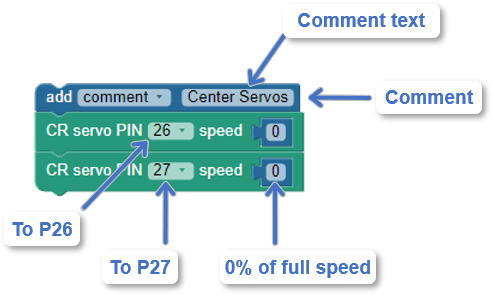
The CR servo PIN 26 speed 0 block tells the Propeller to send servo control signals to its P26 servo port.  Those signals tell the continuous rotation servo connected to that port to hold a speed of zero.  The last block is CR servo PIN 27 speed 0, which tells the Propeller to send those same zero speed signals to the servo connected to the P27 servo port.


Did You Know?

The POWER switch is designed so that 0 shuts everything off.  This includes the Propeller FLiP.  Even if it’s connected to USB, it will not accept a program until you set POWER to 1 or 2.  The POWER 1 setting turns everything on except the servos.  The POWER 2 setting turns everything on, including the servos.  
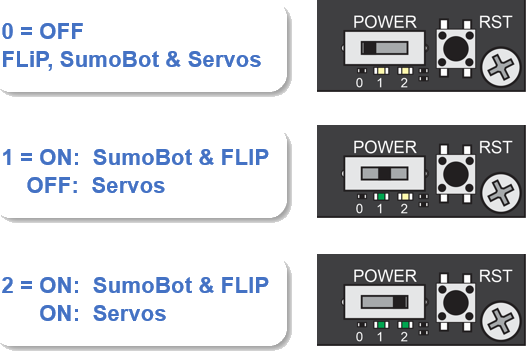
You will typically use POWER 1 to load programs at your computer.  Since the POWER 1 doesn’t supply the servos, it will prevent your SumoBot WX from trying to roll away and off the table when the code starts. 

If you used the Load & run (store in EEPROM) button to load the program into the SumoBot, you can take it to your SumoRing and then start the program from the beginning like this:

  • Press and hold the (RST) reset button.
  • Switch POWER to 2.  
  • Release the reset button.

After you release the reset button, the program will start from the beginning.

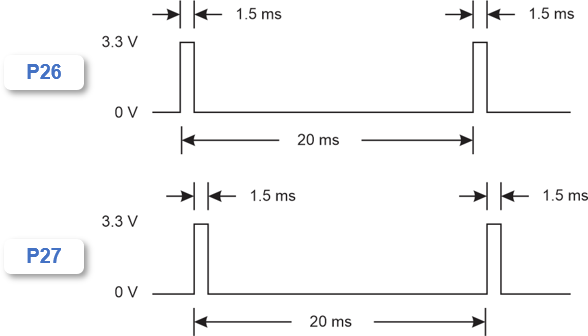
The signal that controls a servo’s speed and direction is a brief high signal that has to be repeated every 20 ms.  That’s 50 times per second.  The stay-still signal stays high for 1.5 ms and low for the remaining 18.5 ms.   If you connected a light emitting diode (LED) circuit’s input to the P26 pin and the other end to ground, the light would glow during those brief 1.5 ms high signals and stay off the rest of the time.


Printer-friendly version
Servo Centering Program
Prev
Test Motor Speeds & Directions
Next

DISCUSSION FORUMS | PARALLAX INC. STORE

About | Terms of Use | Feedback: learn@parallax.com | Copyright©Parallax Inc. 2024

© 2026 Parallax Learn • Built with GeneratePress