Skip to content
Parallax Learn

Parallax Learn

  • Welcome
  • Tutorials
        • Tutorial Series head tag

          Tutorial Series
        • Tutorial Series

          The special, classroom-ready series pages are organized collections of tutorials for our most popular hardware and/or languages. The tutorials for each topic are conveniently accessible from a single page, shown in the order it is recommended that they be completed.
        • Robotics Series Head tag

          Robotics Series
        • Robotics Series

          • Artificial Intelligence
          • Cybersecurity: Radio Data tutorialCybersecurity
          • cyber:bot + Python
          • cyber:bot + MakeCode
          • Boe-Bot Tutorial SeriesBoe-Bot
          • Arduino Shield-Bot
          • ActivityBot with C TutorialsActivityBot + C
          • ActivityBot with BlocklyProp Tutorial SeriesActivityBot + BlocklyProp
          • Scribbler 3 Tutorial SeriesScribbler 3
        • Electronics & Programming Series Head tag

          Electronics & Programming Series
          • BS2 Board of Education Tutorial SeriesBS2 Board of Education
          • Propeller C-Language BasicsPropeller C Basics
          • FLiP Try-It Kit C Tutorial SeriesFLiP Try-It Kit + C
          • FLiP Try-It Kit BlocklyProp TutorialsFLiP Try-It Kit + BlocklyProp
          • Badge WX Tutorial SeriesBadge WX
          • Propeller BlocklyProp Basics and ProjectsPropeller BlocklyProp Basics
          • View All Tutorial Series »
        • Browse Tutorials
        • Browse Tutorials

          Individual tutorials sorted by robot or kit, and language.
        • By Robot or Kit
          • ActivityBot
          • SumoBot WX
          • Boe-Bot
          • Shield-Bot
          • cyber:bot
          • Badge WX
          • ELEV-8
          • ARLO
        • By Language
        • By Language

          • Propeller C
          • Arduino
          • BlocklyProp
          • PBASIC
          • Python
          • MakeCode
          • View All Tutorials »
  • Educators
  • Reference
  • Downloads
  • Home
  • All Courses
  • SumoBot WX Movement Basics

SumoBot WX Movement Basics

How the Maneuver Code Works

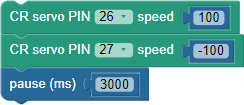
These blocks make the SumoBot roll forward at full speed, by making the left (P26) servo turn counterclockwise with a speed of 100 and the right P27 servo turn clockwise with a speed of -100.  This maneuver continues for 3 seconds.  It could potentially go longer than that if the next blocks are not CR servo PIN…speed… blocks.
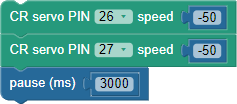
These blocks make the SumoBot turn in place to the left at half speed, by making both the left (P26) and right P27 servo both turn clockwise with a speed of -50.  The result is that the SumoBot spins in place turning left, and the maneuver also continues for 3 seconds.  
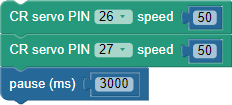
These two blocks are almost identical to the previous ones.  The only difference is that the speed values are both 50 instead of -50.  Since both blocks are positive instead of negative, both wheels turn counterclockwise instead of clockwise.  The result is that the SumoBot turns in place to the right (instead of to the left).  
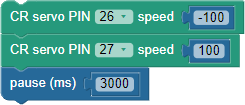
Compare these blocks to the full speed forward blocks at the beginning of this program.  See how the negative signs are swapped?  That’s a sure sign that the SumoBot will roll in the opposite direction—backward in this case.  The P26 left wheel turns at a speed of -100, which is full speed clockwise, and the P27 right wheel turns at a speed of 100, which is full speed counterclockwise.  As with the other maneuvers, this one continues for 3 seconds.
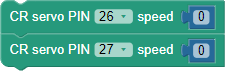
These two blocks set the servos to zero speed, and since no other blocks are below it, the program ends.  Since another processor is managing the servo signals, it continues to send the zero speed signal to both servos.


Printer-friendly version
Maneuver Program
Prev
Try This: Time and Distance
Next

DISCUSSION FORUMS | PARALLAX INC. STORE

About | Terms of Use | Feedback: learn@parallax.com | Copyright©Parallax Inc. 2024

© 2026 Parallax Learn • Built with GeneratePress