Skip to content
Parallax Learn

Parallax Learn

  • Welcome
  • Tutorials
        • Tutorial Series head tag

          Tutorial Series
        • Tutorial Series

          The special, classroom-ready series pages are organized collections of tutorials for our most popular hardware and/or languages. The tutorials for each topic are conveniently accessible from a single page, shown in the order it is recommended that they be completed.
        • Robotics Series Head tag

          Robotics Series
        • Robotics Series

          • Artificial Intelligence
          • Cybersecurity: Radio Data tutorialCybersecurity
          • cyber:bot + Python
          • cyber:bot + MakeCode
          • Boe-Bot Tutorial SeriesBoe-Bot
          • Arduino Shield-Bot
          • ActivityBot with C TutorialsActivityBot + C
          • ActivityBot with BlocklyProp Tutorial SeriesActivityBot + BlocklyProp
          • Scribbler 3 Tutorial SeriesScribbler 3
        • Electronics & Programming Series Head tag

          Electronics & Programming Series
          • BS2 Board of Education Tutorial SeriesBS2 Board of Education
          • Propeller C-Language BasicsPropeller C Basics
          • FLiP Try-It Kit C Tutorial SeriesFLiP Try-It Kit + C
          • FLiP Try-It Kit BlocklyProp TutorialsFLiP Try-It Kit + BlocklyProp
          • Badge WX Tutorial SeriesBadge WX
          • Propeller BlocklyProp Basics and ProjectsPropeller BlocklyProp Basics
          • View All Tutorial Series »
        • Browse Tutorials
        • Browse Tutorials

          Individual tutorials sorted by robot or kit, and language.
        • By Robot or Kit
          • ActivityBot
          • SumoBot WX
          • Boe-Bot
          • Shield-Bot
          • cyber:bot
          • Badge WX
          • ELEV-8
          • ARLO
        • By Language
        • By Language

          • Propeller C
          • Arduino
          • BlocklyProp
          • PBASIC
          • Python
          • MakeCode
          • View All Tutorials »
  • Educators
  • Reference
  • Downloads
  • Home
  • All Courses
  • SumoBot WX Movement Basics

SumoBot WX Movement Basics

Maneuver Program

Program

  • In BlocklyProp Solo, create a New Project named Forward Left Right Backward Stop with a Board Type of Propeller FLiP or Project Board.
  • Build the program shown below, and then Save.
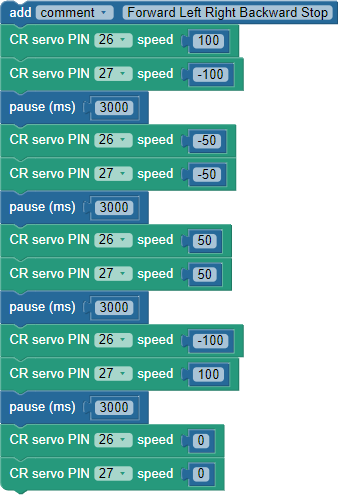
Procedure

This program will make the SumoBot execute this sequence of 3-second maneuvers: roll forward, spin left, spin right, roll backward, stop.  In addition to getting familiar with using speeds and times for maneuvers, it will also help verify that the serovs are connected properly with the left servo connected to the P26 port and the right to P27.

  • Set the POWER switch to 1.
  • Click Load & Run (Save code to EEPROM) to load the program into your SumoBot.  
  • When the program is done loading, set the POWER switch to 0, and disconnect the SumoBot from the USB cable.
  • Seet an empty floor that’s smooth, or a large table.
  • Press the RST button, set the POWER switch to 2, and let go of the RST button.
  • Verify that the SumoBot starts by rolling forward (toward the plow) for three seconds.
  • If the SumoBot’s first maneuver was rolling backward instead of forward, it means the servo cables are swapped.  In other words, the cable that should be plugged into P26 is plugged into P27 and vice versa.
  • Verify that after rolling forward, the SumoBot spins in place, turning left for 3 seconds, then right for 3 seconds before backing up for 3 seconds and stopping.

If you noticed that your SumoBot was veering slightly to the right or left at top speed, the trick to correcting it is to figure out which wheel is turning faster and slow it down with a lower speed value.  More about that in the Your Turn section…


Printer-friendly version
Maneuver Basics
Prev
How the Maneuver Code Works
Next

DISCUSSION FORUMS | PARALLAX INC. STORE

About | Terms of Use | Feedback: learn@parallax.com | Copyright©Parallax Inc. 2024

© 2026 Parallax Learn • Built with GeneratePress