Skip to content
Parallax Learn

Parallax Learn

  • Welcome
  • Tutorials
        • Tutorial Series head tag

          Tutorial Series
        • Tutorial Series

          The special, classroom-ready series pages are organized collections of tutorials for our most popular hardware and/or languages. The tutorials for each topic are conveniently accessible from a single page, shown in the order it is recommended that they be completed.
        • Robotics Series Head tag

          Robotics Series
        • Robotics Series

          • Artificial Intelligence
          • Cybersecurity: Radio Data tutorialCybersecurity
          • cyber:bot + Python
          • cyber:bot + MakeCode
          • Boe-Bot Tutorial SeriesBoe-Bot
          • Arduino Shield-Bot
          • ActivityBot with C TutorialsActivityBot + C
          • ActivityBot with BlocklyProp Tutorial SeriesActivityBot + BlocklyProp
          • Scribbler 3 Tutorial SeriesScribbler 3
        • Electronics & Programming Series Head tag

          Electronics & Programming Series
          • BS2 Board of Education Tutorial SeriesBS2 Board of Education
          • Propeller C-Language BasicsPropeller C Basics
          • FLiP Try-It Kit C Tutorial SeriesFLiP Try-It Kit + C
          • FLiP Try-It Kit BlocklyProp TutorialsFLiP Try-It Kit + BlocklyProp
          • Badge WX Tutorial SeriesBadge WX
          • Propeller BlocklyProp Basics and ProjectsPropeller BlocklyProp Basics
          • View All Tutorial Series »
        • Browse Tutorials
        • Browse Tutorials

          Individual tutorials sorted by robot or kit, and language.
        • By Robot or Kit
          • ActivityBot
          • SumoBot WX
          • Boe-Bot
          • Shield-Bot
          • cyber:bot
          • Badge WX
          • ELEV-8
          • ARLO
        • By Language
        • By Language

          • Propeller C
          • Arduino
          • BlocklyProp
          • PBASIC
          • Python
          • MakeCode
          • View All Tutorials »
  • Educators
  • Reference
  • Downloads
  • Home
  • All Courses
  • SumoBot WX Movement Basics

SumoBot WX Movement Basics

Speed & Direction Program

  • In BlocklyProp Solo, create a New Project named CCW CW Stop with a Board Type of Propeller FLiP or Project Board.
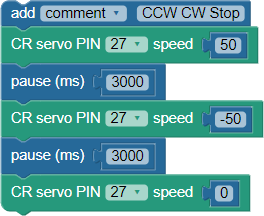
  • Create this block program and save it.
  • (If you are unsure where to find certain blocks or how to make them match this picture, check the animated and checklist steps below.)
Animated Steps
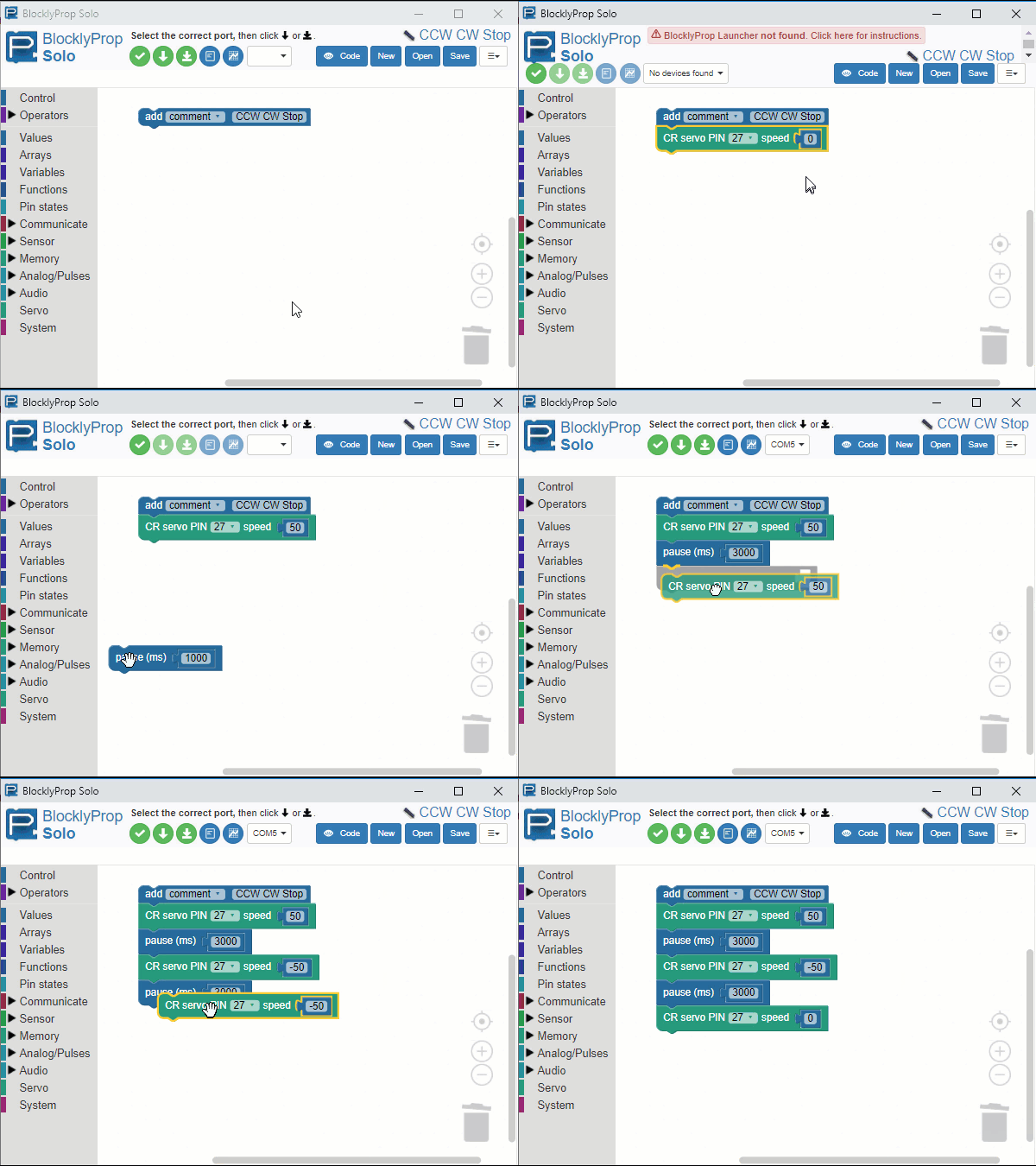
Checklist  Steps

  • Place an add comment block from the Control category, and type CCW CW Stop into the text field.
  • Place a CR servo PIN…speed block from the Servo category, and set its PIN dropdown to 27 and its speed value to 50.  Connect it below the comment block.
  • Place a pause (ms) block from the Control category and change the value from 1000 to 3000.  Connect it below the CR servo PIN 27 speed 50 block.
  • Right-click and duplicate the CR servo speed block.  Change the speed in the duplicated block to -50, and connect it below the pause (ms) 3000 block.
  • Richt-click and duplicate the pause (ms) 3000 block, and connect it below the CR servo PIN 27 speed -50 block.
  • Right-click and duplicate the CR servo PIN 27 speed -50 block, and connect it below the pause (ms) 3000 block you just placed.  Then, change its speed value to 0.

Procedure

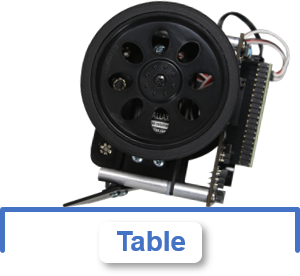
For this test, we’ll keep the SumoBot WX face down on the table so that the wheels can spin freely.  With the POWER switch set to 2 and the program running, the robot’s right wheel should turn counterclockwise for 3 seconds, then clockwise for three seconds, then stop.

  • Set the SumoBot WX face down on the table so that its wheels do not touch the surface.
  • Make sure it’s right wheel is facing you, as shown here.
  • Set the POWER switch to 2.
  • Click Load & Run (Save code to EEPROM) to load the program into your SumoBot.  
  • Verify that the right wheel rotates counterclockwise for 3 seconds, then clockwise for 3 seconds, and then stops.
  • Press/release the SumoBot board’s reset (RST) button to start restart the program from the beginning and see the wheel motions again.
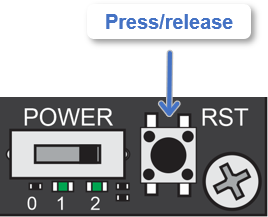
If the other wheel turns, it means that the servo cables connected to P26 and P27 are reversed and need to be swapped.


Printer-friendly version
Test Motor Speeds & Directions
Prev
How the Wheel Test Works
Next

DISCUSSION FORUMS | PARALLAX INC. STORE

About | Terms of Use | Feedback: learn@parallax.com | Copyright©Parallax Inc. 2024

© 2026 Parallax Learn • Built with GeneratePress