Skip to content
Parallax Learn

Parallax Learn

  • Welcome
  • Tutorials
        • Tutorial Series head tag

          Tutorial Series
        • Tutorial Series

          The special, classroom-ready series pages are organized collections of tutorials for our most popular hardware and/or languages. The tutorials for each topic are conveniently accessible from a single page, shown in the order it is recommended that they be completed.
        • Robotics Series Head tag

          Robotics Series
        • Robotics Series

          • Artificial Intelligence
          • Cybersecurity: Radio Data tutorialCybersecurity
          • cyber:bot + Python
          • cyber:bot + MakeCode
          • Boe-Bot Tutorial SeriesBoe-Bot
          • Arduino Shield-Bot
          • ActivityBot with C TutorialsActivityBot + C
          • ActivityBot with BlocklyProp Tutorial SeriesActivityBot + BlocklyProp
          • Scribbler 3 Tutorial SeriesScribbler 3
        • Electronics & Programming Series Head tag

          Electronics & Programming Series
          • BS2 Board of Education Tutorial SeriesBS2 Board of Education
          • Propeller C-Language BasicsPropeller C Basics
          • FLiP Try-It Kit C Tutorial SeriesFLiP Try-It Kit + C
          • FLiP Try-It Kit BlocklyProp TutorialsFLiP Try-It Kit + BlocklyProp
          • Badge WX Tutorial SeriesBadge WX
          • Propeller BlocklyProp Basics and ProjectsPropeller BlocklyProp Basics
          • View All Tutorial Series »
        • Browse Tutorials
        • Browse Tutorials

          Individual tutorials sorted by robot or kit, and language.
        • By Robot or Kit
          • ActivityBot
          • SumoBot WX
          • Boe-Bot
          • Shield-Bot
          • cyber:bot
          • Badge WX
          • ELEV-8
          • ARLO
        • By Language
        • By Language

          • Propeller C
          • Arduino
          • BlocklyProp
          • PBASIC
          • Python
          • MakeCode
          • View All Tutorials »
  • Educators
  • Reference
  • Downloads
  • Home
  • All Courses
  • SumoBot WX Movement Basics

SumoBot WX Movement Basics

Test Motor Speeds & Directions

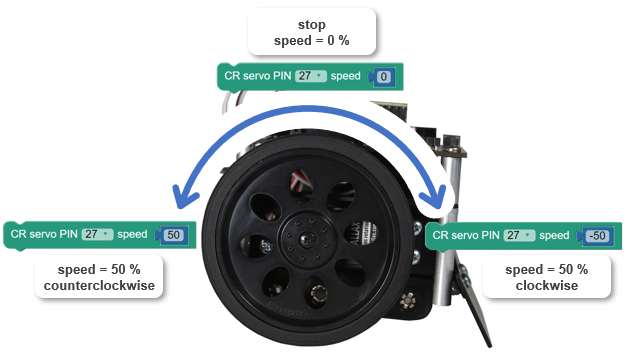
Now that the servos are centered, the CR servo PIN speed blocks can set rotation speeds and directions.  This test will make the right servo turn at half speed counterclockwise, then half speed clockwise, then stop. 

After testing the right servo that’s connected to P27, you will change all the PIN values from 27 to 26 to test the left servo. You can also try increasing and decreasing the +/- 50 speed values to increase or decrease the wheel speeds.
Parts

  • SumoBot, built up at least through the end of the Build your SumoBot WX pages
  • USB A to micro-B cable
  • Parallax Screwdriver
  • 4 AA batteries (in the SumoBot Robot’s battery pack)

Prep

  • 4 AA batteries in the battery pack.
  • 3-position POWER switch set to 1.  (You will set it to 2 after loading the program.)
  • BATT LOW light off.  If it’s on, that means it’s time for fresh batteries!
  • SumoBot connected to your computer’s USB port.
  • BlocklyProp Launcher running, and BlocklyProp Solo launched.
  • Ports dropdown set to your SumoBot’s port number like you did in Connect, Power & Run.


Printer-friendly version
How the Centering Program Works
Prev
Speed & Direction Program
Next

DISCUSSION FORUMS | PARALLAX INC. STORE

About | Terms of Use | Feedback: learn@parallax.com | Copyright©Parallax Inc. 2024

© 2026 Parallax Learn • Built with GeneratePress