Skip to content
Parallax Learn

Parallax Learn

  • Welcome
  • Tutorials
        • Tutorial Series head tag

          Tutorial Series
        • Tutorial Series

          The special, classroom-ready series pages are organized collections of tutorials for our most popular hardware and/or languages. The tutorials for each topic are conveniently accessible from a single page, shown in the order it is recommended that they be completed.
        • Robotics Series Head tag

          Robotics Series
        • Robotics Series

          • Artificial Intelligence
          • Cybersecurity: Radio Data tutorialCybersecurity
          • cyber:bot + Python
          • cyber:bot + MakeCode
          • Boe-Bot Tutorial SeriesBoe-Bot
          • Arduino Shield-Bot
          • ActivityBot with C TutorialsActivityBot + C
          • ActivityBot with BlocklyProp Tutorial SeriesActivityBot + BlocklyProp
          • Scribbler 3 Tutorial SeriesScribbler 3
        • Electronics & Programming Series Head tag

          Electronics & Programming Series
          • BS2 Board of Education Tutorial SeriesBS2 Board of Education
          • Propeller C-Language BasicsPropeller C Basics
          • FLiP Try-It Kit C Tutorial SeriesFLiP Try-It Kit + C
          • FLiP Try-It Kit BlocklyProp TutorialsFLiP Try-It Kit + BlocklyProp
          • Badge WX Tutorial SeriesBadge WX
          • Propeller BlocklyProp Basics and ProjectsPropeller BlocklyProp Basics
          • View All Tutorial Series »
        • Browse Tutorials
        • Browse Tutorials

          Individual tutorials sorted by robot or kit, and language.
        • By Robot or Kit
          • ActivityBot
          • SumoBot WX
          • Boe-Bot
          • Shield-Bot
          • cyber:bot
          • Badge WX
          • ELEV-8
          • ARLO
        • By Language
        • By Language

          • Propeller C
          • Arduino
          • BlocklyProp
          • PBASIC
          • Python
          • MakeCode
          • View All Tutorials »
  • Educators
  • Reference
  • Downloads
  • Home
  • All Courses
  • SumoBot WX Movement Basics

SumoBot WX Movement Basics

Try This: Time and Distance

Each maneuver involves two wheel speeds and an amount of time.  

To decrease the distance of a forward or backward maneuver, you have a choice of decreasing either the speed or the time.  Likewise, distance will increase with either a longer time traveled or a higher speed.  Increasing the speed to increase distance only works if the servos are not already going at top speed though.

Turns can also be greater or smaller angles, and speed and time are the two variables that can be adjusted.  If speed remains the same, but time is reduced, the angle turned will be less.  Alternatively, the maneuver time can be left unchanged and the wheel speeds can be increased or decreased for smaller or larger angle turns.  

When the SumoBot can “see” its opponent, top speed maneuvers to either start pushing or get out of the way are common.  If the SumoBot is searching for its opponent, it is sometimes better to move slower while scanning left and right with sensors.

Try This

Let’s take a closer look at how changing the maneuver times changes the distances traveled and angles turned.

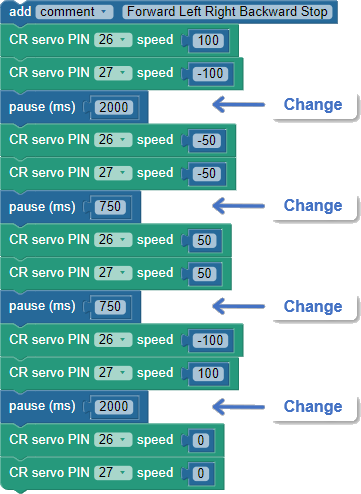
  • Modify your maneuver program so that instead of taking 3 seconds for each maneuver, it takes 2 seconds for the forward and backward maneuvers and 0.75 seconds for each turn.  
  • Test the program, and verify that it travels about ⅔ of the previous forward/backward distances and much shorter turns.
  • Tune the 750 times so that the SumoBot executes a 90⁰ left turn followed by a 90⁰ right turn.


Printer-friendly version
How the Maneuver Code Works
Prev
Your Turn: Maneuver Challenges
Next

DISCUSSION FORUMS | PARALLAX INC. STORE

About | Terms of Use | Feedback: learn@parallax.com | Copyright©Parallax Inc. 2024

© 2026 Parallax Learn • Built with GeneratePress