Skip to content
Parallax Learn

Parallax Learn

  • Welcome
  • Tutorials
        • Tutorial Series head tag

          Tutorial Series
        • Tutorial Series

          The special, classroom-ready series pages are organized collections of tutorials for our most popular hardware and/or languages. The tutorials for each topic are conveniently accessible from a single page, shown in the order it is recommended that they be completed.
        • Robotics Series Head tag

          Robotics Series
        • Robotics Series

          • Artificial Intelligence
          • Cybersecurity: Radio Data tutorialCybersecurity
          • cyber:bot + Python
          • cyber:bot + MakeCode
          • Boe-Bot Tutorial SeriesBoe-Bot
          • Arduino Shield-Bot
          • ActivityBot with C TutorialsActivityBot + C
          • ActivityBot with BlocklyProp Tutorial SeriesActivityBot + BlocklyProp
          • Scribbler 3 Tutorial SeriesScribbler 3
        • Electronics & Programming Series Head tag

          Electronics & Programming Series
          • BS2 Board of Education Tutorial SeriesBS2 Board of Education
          • Propeller C-Language BasicsPropeller C Basics
          • FLiP Try-It Kit C Tutorial SeriesFLiP Try-It Kit + C
          • FLiP Try-It Kit BlocklyProp TutorialsFLiP Try-It Kit + BlocklyProp
          • Badge WX Tutorial SeriesBadge WX
          • Propeller BlocklyProp Basics and ProjectsPropeller BlocklyProp Basics
          • View All Tutorial Series »
        • Browse Tutorials
        • Browse Tutorials

          Individual tutorials sorted by robot or kit, and language.
        • By Robot or Kit
          • ActivityBot
          • SumoBot WX
          • Boe-Bot
          • Shield-Bot
          • cyber:bot
          • Badge WX
          • ELEV-8
          • ARLO
        • By Language
        • By Language

          • Propeller C
          • Arduino
          • BlocklyProp
          • PBASIC
          • Python
          • MakeCode
          • View All Tutorials »
  • Educators
  • Reference
  • Downloads
  • Home
  • All Courses
  • SumoBot WX Movement Basics

SumoBot WX Movement Basics

Your Turn: Maneuver Challenges

As mentioned at the beginning, the more practice you get with maneuvers, the better.  So, here are some challenges to help build your maneuver creating and building skills.

Tuning: Straighten Forward and Backward

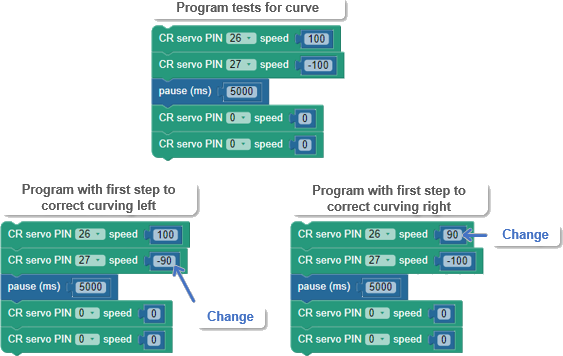
If your SumoBot curved when you expected it to go straight, the solution is simple: slow down the faster wheel.  Here are three short example programs.  The top-center one is the test to see if your SumoBot curves.  If it curves to the left, the first step is to change the CR servo PIN 27 block’s speed value from 100 to 90.  If it curves to the right, the first step is to change the CR servo PIN 26 block’s speed value from 100 to 90.  

  • Enter and run the first program to see if your SumoBot curves to the right or left.
  • If your SumoBot curved, take the first step shown below to correct the curve, and re-test it.
 

  • If the first try corrected it, then great! 
  • If the SumoBot curves less in the same direction as before, increase your adjustment, to maybe PIN 27 speed -85 to correct left curves or PIN 26 speed 85 to correct right curves. 
  • Keep on adjusting until you find the best value. 

Also, keep in mind that making the SumoBot go perfectly straight is not nearly as important in the Sumo ring as it would be in a dead reckoning contest where every little error adds up. 

Pivots and Curves

This activity began with an explanation of the variety of maneuvers two independent drive wheels could execute.  Some examples we haven’t tried yet include pivots, where one wheel is set to speed zero, and curves, where the two wheel speeds are different, like one wheel with speed 100, and the other with speed 50.

  • Save Forward Left Right Backward Stop as Pivots and Curves.
  • Modify the program so that it executes two forward pivots, two backward pivots, two forward curves, and two backward curves.

Shapes

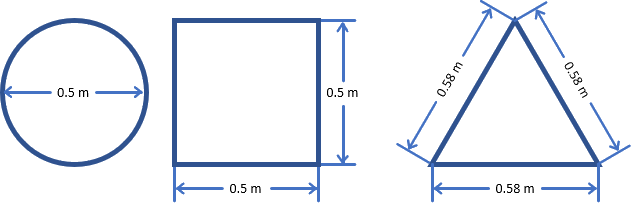
  • Use masking tape on a desk or smooth floor to create shapes, then write BlocklyProp programs to make the SumoBot navigate over each shape without going off the tape.


Printer-friendly version
Try This: Time and Distance
Prev

DISCUSSION FORUMS | PARALLAX INC. STORE

About | Terms of Use | Feedback: learn@parallax.com | Copyright©Parallax Inc. 2024

© 2026 Parallax Learn • Built with GeneratePress