Skip to content
Parallax Learn

Parallax Learn

  • Welcome
  • Tutorials
        • Tutorial Series head tag

          Tutorial Series
        • Tutorial Series

          The special, classroom-ready series pages are organized collections of tutorials for our most popular hardware and/or languages. The tutorials for each topic are conveniently accessible from a single page, shown in the order it is recommended that they be completed.
        • Robotics Series Head tag

          Robotics Series
        • Robotics Series

          • Artificial Intelligence
          • Cybersecurity: Radio Data tutorialCybersecurity
          • cyber:bot + Python
          • cyber:bot + MakeCode
          • Boe-Bot Tutorial SeriesBoe-Bot
          • Arduino Shield-Bot
          • ActivityBot with C TutorialsActivityBot + C
          • ActivityBot with BlocklyProp Tutorial SeriesActivityBot + BlocklyProp
          • Scribbler 3 Tutorial SeriesScribbler 3
        • Electronics & Programming Series Head tag

          Electronics & Programming Series
          • BS2 Board of Education Tutorial SeriesBS2 Board of Education
          • Propeller C-Language BasicsPropeller C Basics
          • FLiP Try-It Kit C Tutorial SeriesFLiP Try-It Kit + C
          • FLiP Try-It Kit BlocklyProp TutorialsFLiP Try-It Kit + BlocklyProp
          • Badge WX Tutorial SeriesBadge WX
          • Propeller BlocklyProp Basics and ProjectsPropeller BlocklyProp Basics
          • View All Tutorial Series »
        • Browse Tutorials
        • Browse Tutorials

          Individual tutorials sorted by robot or kit, and language.
        • By Robot or Kit
          • ActivityBot
          • SumoBot WX
          • Boe-Bot
          • Shield-Bot
          • cyber:bot
          • Badge WX
          • ELEV-8
          • ARLO
        • By Language
        • By Language

          • Propeller C
          • Arduino
          • BlocklyProp
          • PBASIC
          • Python
          • MakeCode
          • View All Tutorials »
  • Educators
  • Reference
  • Downloads
  • Home
  • All Courses
  • Tilt Tones with BlocklyProp

Tilt Tones with BlocklyProp

Extra Parts for FLiP Kit

If you are using the Propeller FLiP Try-it Kit, you can add additional parts to this project, using the extra breadboard space and free Propeller I/O pins. 

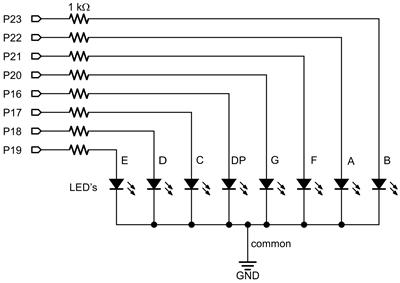
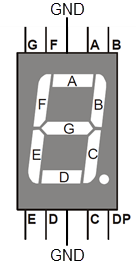
A 7-segment LED display (left) visually indicates the direction of tilt by lighting up the segments that correspond to the lowest edge of the breadboard. See the Seven-Segment Display tutorial to learn more about how this device works.

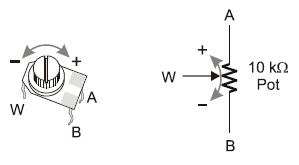
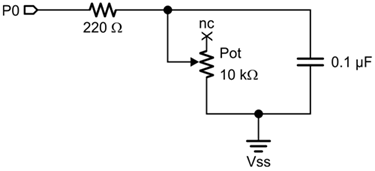
A potentiometer (right) will let you adjust the tempo all you want during run-time just by twisting the potentiometer’s knob. You will not need to modify the set variable beat block and reprogram your FLiP module just to change the tempo. You can learn more about the potentiometer and this circuit from the Potentiometer Position page in the Circuit Practice with BlocklyProp tutorial.
   

Additional parts needed

  • (1) 7-segment LED (# 350-00027)
  • (8) 1 k-ohm resistors, brown-black-red
  • (1) 10 k-ohm potentiometer (# 152-01031)
  • (1) 0.1 µF capacitor, marked 104
  • (1) 220-ohm resistor, red-red-brown
  • (misc) jumper wires

I/O Pin Assignments

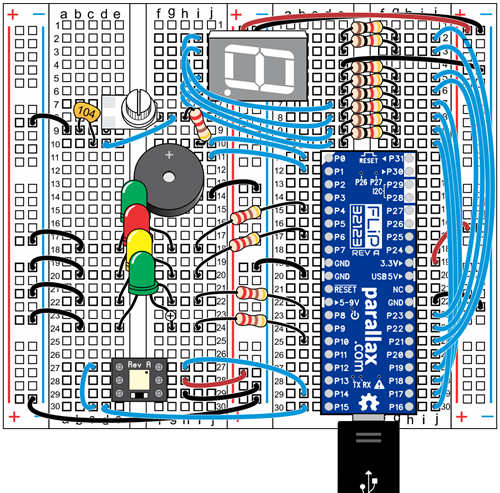
  • P0 — potentiometer
  • P16-P23 — 7-segment LED

Build the New Circuits

  • Disconnect power from your Propeller FLiP module.
  • Build the potentiometer circuit in the position shown in the wiring diagram below.
  • Optionally build the 7-segment LED circuit. Note that the I/O pin numbers are not sequential.


Printer-friendly version
Tune your Tilt Tones
Prev
Extra Blocks for FLiP Kit
Next

DISCUSSION FORUMS | PARALLAX INC. STORE

About | Terms of Use | Feedback: learn@parallax.com | Copyright©Parallax Inc. 2024

© 2025 Parallax Learn • Built with GeneratePress