Skip to content
Parallax Learn

Parallax Learn

  • Welcome
  • Tutorials
        • Tutorial Series head tag

          Tutorial Series
        • Tutorial Series

          The special, classroom-ready series pages are organized collections of tutorials for our most popular hardware and/or languages. The tutorials for each topic are conveniently accessible from a single page, shown in the order it is recommended that they be completed.
        • Robotics Series Head tag

          Robotics Series
        • Robotics Series

          • Artificial Intelligence
          • Cybersecurity: Radio Data tutorialCybersecurity
          • cyber:bot + Python
          • cyber:bot + MakeCode
          • Boe-Bot Tutorial SeriesBoe-Bot
          • Arduino Shield-Bot
          • ActivityBot with C TutorialsActivityBot + C
          • ActivityBot with BlocklyProp Tutorial SeriesActivityBot + BlocklyProp
          • Scribbler 3 Tutorial SeriesScribbler 3
        • Electronics & Programming Series Head tag

          Electronics & Programming Series
          • BS2 Board of Education Tutorial SeriesBS2 Board of Education
          • Propeller C-Language BasicsPropeller C Basics
          • FLiP Try-It Kit C Tutorial SeriesFLiP Try-It Kit + C
          • FLiP Try-It Kit BlocklyProp TutorialsFLiP Try-It Kit + BlocklyProp
          • Badge WX Tutorial SeriesBadge WX
          • Propeller BlocklyProp Basics and ProjectsPropeller BlocklyProp Basics
          • View All Tutorial Series »
        • Browse Tutorials
        • Browse Tutorials

          Individual tutorials sorted by robot or kit, and language.
        • By Robot or Kit
          • ActivityBot
          • SumoBot WX
          • Boe-Bot
          • Shield-Bot
          • cyber:bot
          • Badge WX
          • ELEV-8
          • ARLO
        • By Language
        • By Language

          • Propeller C
          • Arduino
          • BlocklyProp
          • PBASIC
          • Python
          • MakeCode
          • View All Tutorials »
  • Educators
  • Reference
  • Downloads
  • Home
  • All Courses

Add a Pixy2 CMUcam to an ActivityBot 360°

Curriculum

  • 1 Section
  • 3 Lessons
  • Lifetime
Expand all sectionsCollapse all sections
  • Add a Pixy2 CMUcam to an ActivityBot 360°
    3
    • 1.0
      Pixy2 with Mounting Hardware Parts
    • 1.1
      Mount the Pixy2 on the ActivityBot 360°
    • 1.2
      Make the Pixy2 Connections

Make the Pixy2 Connections

Camera Connections

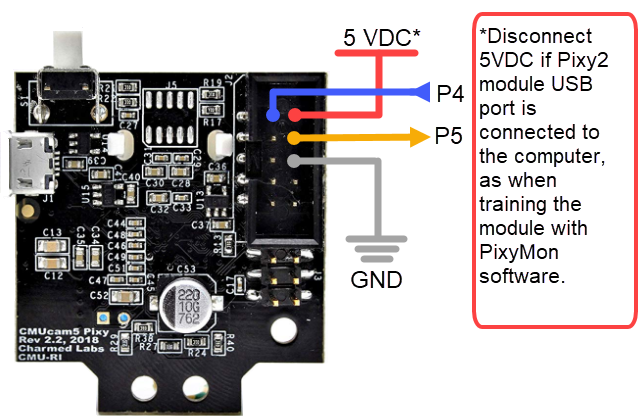
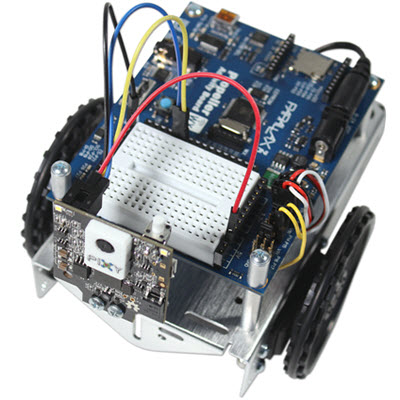
  • Peel apart the 100 mm MF jumper wires and make the connections between the Pixy2 module and your Propeller Activity Board WX as shown below. Note that you must leave the 5 VDC wire disconnected if you have your Pixy2 module’s USB port connected to a computer.
 

Pixy2 Propeller Example Code

Now your ActivityBot 360° is ready to run the Pixy2 test code available in BlocklyProp, Propeller C, or Spin language:

Pixy2 CMUcam Demo Code Downloads


Pixy2 Guides & Resources

The Pixy2 module needs to be trained to recognize the objects you want it to detect when you are running your Propeller program.  For guides on how to train your Pixy2 using the PixyMon software, see the official Pixy2 Index at pixycam.com.

Pixy2 Resource Index


Printer-friendly version
Mount the Pixy2 on the ActivityBot 360°
Prev

DISCUSSION FORUMS | PARALLAX INC. STORE

About | Terms of Use | Feedback: learn@parallax.com | Copyright©Parallax Inc. 2024

© 2026 Parallax Learn • Built with GeneratePress