Skip to content
Parallax Learn

Parallax Learn

  • Welcome
  • Tutorials
        • Tutorial Series head tag

          Tutorial Series
        • Tutorial Series

          The special, classroom-ready series pages are organized collections of tutorials for our most popular hardware and/or languages. The tutorials for each topic are conveniently accessible from a single page, shown in the order it is recommended that they be completed.
        • Robotics Series Head tag

          Robotics Series
        • Robotics Series

          • Artificial Intelligence
          • Cybersecurity: Radio Data tutorialCybersecurity
          • cyber:bot + Python
          • cyber:bot + MakeCode
          • Boe-Bot Tutorial SeriesBoe-Bot
          • Arduino Shield-Bot
          • ActivityBot with C TutorialsActivityBot + C
          • ActivityBot with BlocklyProp Tutorial SeriesActivityBot + BlocklyProp
          • Scribbler 3 Tutorial SeriesScribbler 3
        • Electronics & Programming Series Head tag

          Electronics & Programming Series
          • BS2 Board of Education Tutorial SeriesBS2 Board of Education
          • Propeller C-Language BasicsPropeller C Basics
          • FLiP Try-It Kit C Tutorial SeriesFLiP Try-It Kit + C
          • FLiP Try-It Kit BlocklyProp TutorialsFLiP Try-It Kit + BlocklyProp
          • Badge WX Tutorial SeriesBadge WX
          • Propeller BlocklyProp Basics and ProjectsPropeller BlocklyProp Basics
          • View All Tutorial Series »
        • Browse Tutorials
        • Browse Tutorials

          Individual tutorials sorted by robot or kit, and language.
        • By Robot or Kit
          • ActivityBot
          • SumoBot WX
          • Boe-Bot
          • Shield-Bot
          • cyber:bot
          • Badge WX
          • ELEV-8
          • ARLO
        • By Language
        • By Language

          • Propeller C
          • Arduino
          • BlocklyProp
          • PBASIC
          • Python
          • MakeCode
          • View All Tutorials »
  • Educators
  • Reference
  • Downloads
  • Home
  • All Courses

Add Servos to the ELEV-8 v3

Curriculum

  • 1 Section
  • 7 Lessons
  • Lifetime
Expand all sectionsCollapse all sections
  • Add Servos to the ELEV-8 v3
    7
    • 1.0
      Drive a Servo with the RC Receiver
    • 1.1
      Parts and Prep
    • 1.2
      Edit the Firmware for Servos
    • 1.3
      Connect a Servo to the Flight Controller
    • 1.4
      Build a Servo Power Supply
    • 1.5
      Use Pitch and Roll from the IMU
    • 1.6
      Safety Test after Hacking

Build a Servo Power Supply

An Advanced Hardware Hack

If you plan to attach a servo to your ELEV-8 v3 and use it in flight, it is a good idea to give it its own power supply.  With a few components and a little soldering, it is easy to build a power supply for your additional servos.

DO NOT PROCEED unless the propellers and battery have been removed from your ELEV-8 v3!

  • Gather your materials.
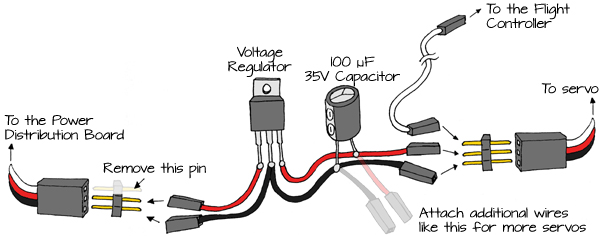
  • Carefully study this diagram:

  • To begin building the power supply shown, cut a red and a black jumper wire in half.
  • Take one half of a red wire and one half of a black wire and cut them in half again – be sure to save all of the pieces.
  • Strip the cut ends of all of the wires so they can be soldered.
  • Solder the wires to the components as shown in the diagram above.
  • Use electrical tape or heat shrink tubing to wrap up exposed connections and keep them from touching each other and shorting out.
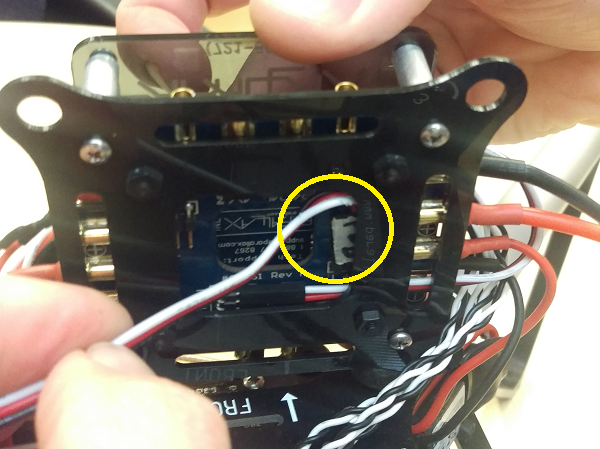
  • Connect the power supply you just built to a 3-pin header on the ELEV-8 Power Distribution Board. You may need to remove the flight stack from the ELEV-8 v3 to reach the connections:
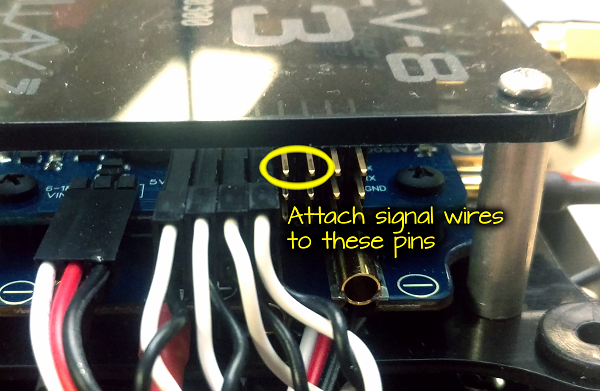
  • Connect a white (signal) jumper wire to the top pin on the header your servo was originally plugged into on the ELEV-8 Flight Controller:
  • Connect the white (signal) wire and power supply to your servo as shown in the drawing above.
  • Turn on your transmitter.
  • Connect your ELEV-8 v3’s battery and veryify that everything is working correctly.

If you hear any popping or hissing, or smell something hot or smoke, immediately disconnect the battery!

DO NOT FLY Your ELEV-8 v3 after modifying the hardware or firmware until you have completed the safety testing on the last page of this tutorial!


Printer-friendly version
Connect a Servo to the Flight Controller
Prev
Use Pitch and Roll from the IMU
Next

DISCUSSION FORUMS | PARALLAX INC. STORE

About | Terms of Use | Feedback: learn@parallax.com | Copyright©Parallax Inc. 2024

© 2026 Parallax Learn • Built with GeneratePress