Skip to content
Parallax Learn

Parallax Learn

  • Welcome
  • Tutorials
        • Tutorial Series head tag

          Tutorial Series
        • Tutorial Series

          The special, classroom-ready series pages are organized collections of tutorials for our most popular hardware and/or languages. The tutorials for each topic are conveniently accessible from a single page, shown in the order it is recommended that they be completed.
        • Robotics Series Head tag

          Robotics Series
        • Robotics Series

          • Artificial Intelligence
          • Cybersecurity: Radio Data tutorialCybersecurity
          • cyber:bot + Python
          • cyber:bot + MakeCode
          • Boe-Bot Tutorial SeriesBoe-Bot
          • Arduino Shield-Bot
          • ActivityBot with C TutorialsActivityBot + C
          • ActivityBot with BlocklyProp Tutorial SeriesActivityBot + BlocklyProp
          • Scribbler 3 Tutorial SeriesScribbler 3
        • Electronics & Programming Series Head tag

          Electronics & Programming Series
          • BS2 Board of Education Tutorial SeriesBS2 Board of Education
          • Propeller C-Language BasicsPropeller C Basics
          • FLiP Try-It Kit C Tutorial SeriesFLiP Try-It Kit + C
          • FLiP Try-It Kit BlocklyProp TutorialsFLiP Try-It Kit + BlocklyProp
          • Badge WX Tutorial SeriesBadge WX
          • Propeller BlocklyProp Basics and ProjectsPropeller BlocklyProp Basics
          • View All Tutorial Series »
        • Browse Tutorials
        • Browse Tutorials

          Individual tutorials sorted by robot or kit, and language.
        • By Robot or Kit
          • ActivityBot
          • SumoBot WX
          • Boe-Bot
          • Shield-Bot
          • cyber:bot
          • Badge WX
          • ELEV-8
          • ARLO
        • By Language
        • By Language

          • Propeller C
          • Arduino
          • BlocklyProp
          • PBASIC
          • Python
          • MakeCode
          • View All Tutorials »
  • Educators
  • Reference
  • Downloads
  • Home
  • All Courses

Add Servos to the ELEV-8 v3

Curriculum

  • 1 Section
  • 7 Lessons
  • Lifetime
Expand all sectionsCollapse all sections
  • Add Servos to the ELEV-8 v3
    7
    • 1.0
      Drive a Servo with the RC Receiver
    • 1.1
      Parts and Prep
    • 1.2
      Edit the Firmware for Servos
    • 1.3
      Connect a Servo to the Flight Controller
    • 1.4
      Build a Servo Power Supply
    • 1.5
      Use Pitch and Roll from the IMU
    • 1.6
      Safety Test after Hacking

Parts and Prep

Preparation – Safety First!

  • Make sure your ELEV-8 is OFF with the BATTERY DISCONNECTED AND REMOVED.
  • REMOVE THE PROPELLERS from the ELEV-8 v3 quadcopter’s motors. They are NOT needed for this tutorial.

What you will need:

A complete, tested, configured ELEV-8 v3 (Parallax Item #80300 or Item #80330) that has a receiver with at least 6 channels, such as:

  • A Spektrum AR610 6-Channel receiver (Parallax Item #80206 or comes with Item #80208), or
  • A Spektrum AR8000 8-Channel receiver (comes with Parallax Item #730-80300)
  • Any compatible transmitter/receiver pair with at least one spare (6 or more total) channel(s)

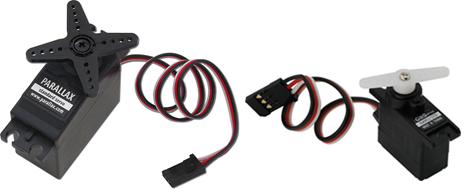
At least one R/C servo, such as:

  • A Parallax Standard Servo (Parallax Item #900-00005, below left) or
  • A Parallax (GWS) NARO Mini Servo (Parallax Item #900-00014, below right)
Optional Mounting Hardware:

If you wish to mount your servos to the bottom chassis plate of your ELEV-8 v3, you will need hardware and/or adhesive, such as:

  • #4-40 screws, locknuts, standoffs, and spacers (Available in hardware packs here or here)
  • Right angle (L-shaped) brackets (Parallax Item #720-00011)
  • Zip ties
  • Hot glue
  • Double-sided foam tape

Optional Separate Power Supply for Servos Under Load

Servos that are under load—lifting a weight or pulling against something—will need more current than if they are just moving freely.  If you are designing an ELEV-8 add-on that will put a load on the servos, they will need more current than the Flight Controller can supply. So, you would also need to build a separate power supply for your servos.

  • A 5V regulator, such as:
    • A low-dropout linear regulator (Parallax Item #601-00506), or
    • A switching regulator (Recommended) (Digikey Item #811-2196-5-ND)
  • A large electrolytic capacitor (Digikey Item #1189-1885-ND or similar)
  • (2) long 3-pin headers (Parallax Item #451-00303)
  • An 8″ 3-pin cable (Parallax Item #800-00080)
  • A soldering iron and solder (Available as a kit: Parallax Item #700-10011)
  • Short Female-to-Female jumper wires (Parallax Item #800-00045)
  • Tools for cutting and stripping wire (Available here, here, or here)
  • Electrical tape and/or heat shrink tubing


Printer-friendly version
Drive a Servo with the RC Receiver
Prev
Edit the Firmware for Servos
Next

DISCUSSION FORUMS | PARALLAX INC. STORE

About | Terms of Use | Feedback: learn@parallax.com | Copyright©Parallax Inc. 2024

© 2026 Parallax Learn • Built with GeneratePress