
Test Arduino to DHB-10 Communication
Test Arduino to DHB-10 Communication
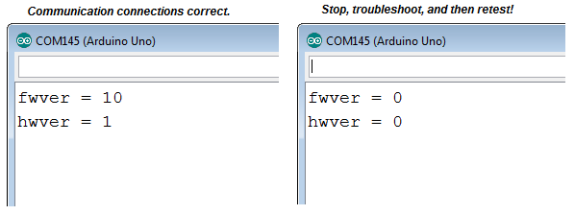
This next sketch asks the DHB-10 for its hardware and firmware versions, and displays the results in Terminal. Here is what you’ll see if your Arduino communicates successfully with the DHB-10 (left) alongside messages you might see if communication fails (right).
IMPORTANT: Your Arlo will not be ready for the next step until it displays nonzero values for fwver and hwver.
NOTE: If your terminal output resembles the one on the right, try the Arlo Failed the Communication Test section in Troubleshooting.
- Make sure your programming cable is connected, the Arlo’s Main power is on, and the BOE Shield’s power switch is set to 2.
- Turn on the Arlo’s Motors power.
- Verify that the DHB-10’s indicator lights blink on/off orange once every second.
- If not, go back to the Arlo Assembly Tutorial and start checking wiring connections.
- Open and run Arlo-Test-Arduino-DHB-10-Communication.ino.
- If the Terminal displays only 0 values (like fwver = 0, hwver = 0), recheck the cables connecting the BOE Shield servo ports to the DHB-10’s Ch1 and Ch2 ports.
- If the Terminal displays the hardware and firmware versions (like fwver = 10, hwver = 1), make a note of the firmware version, and then proceed to the Test Motor Connections section.
/*
Arlo-Test-Arduino-DHB-10-Communication
You'll be ready for the next step when the Arduino Terminal displays:
fwver = 10
hwver = 1
*/

#include <ArloRobot.h>                     // Include Arlo library
#include <SoftwareSerial.h>                   // Include SoftwareSerial library

ArloRobot Arlo;                            // Declare Arlo object

SoftwareSerial ArloSerial(12, 13);            // Declare SoftwareSerial object
                                              // DHB-10 -> I/O 12, DHB-10 <- I/O 13
void setup()                                  // Setup function

{
 tone(4, 3000, 2000);                        // Piezospeaker beep
 Serial.begin(9600);                         // Start terminal serial port

 ArloSerial.begin(19200);                    // Start DHB-10 serial communication
 Arlo.begin(ArloSerial);                     // Pass to Arlo object

 int fwver = Arlo.readFirmwareVer();         // Check DHB-10 firmware
 Serial.print("fwver = ");                   // Display firmware version
 Serial.println(fwver, DEC);

 int hwver = Arlo.readHardwareVer();         // Check DHB-10 hardware
 Serial.print("hwver = ");                   // Display hardware version
 Serial.println(hwver, DEC);
}

void loop() {}                                // Nothing for main loop