
The Finished Timer
Putting it all Together
Figure 2 – The Timer Circuit
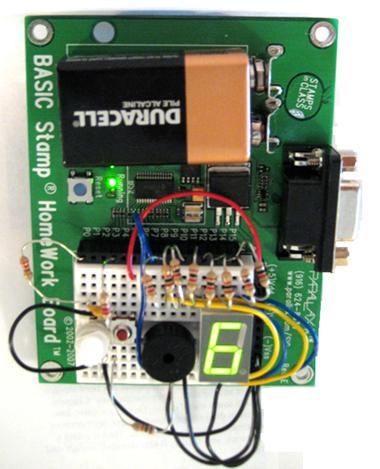
Once the circuit has been tested and the numbers 0–9 are displayed on the 7-Segment LED, there’s just a bit more to add to the code in order to complete the timer.
' -----[ Title ]-------------------------------------------------------------
' MiniTimer.bs2
' Simple timer to time 1-9 minutes based on user input.
' {$STAMP BS2}                               ' Stamp directive -> BS2
' {$PBASIC 2.5}                              ' PBASIC directive -> v2.5

' -----[ Variables ]---------------------------------------------------------

index        VAR    Nib         ' Variable space for LOOKUP/LOOKDOWN
time         VAR    Word        ' Decay time of potentiometer
totalSecs    VAR    Word        ' Total number of minutes entered by user
duration     VAR    Word        ' Variable space for FOR...NEXT loop
frequency    VAR    Word        ' Frequency

' -----[ Initialization ]----------------------------------------------------

OUTH = %00000000                ' Clear LED display
DIRH = %11111111                ' Set pins 8-15 to outputs

FREQOUT 7, 100, 3500            ' Program startup sound
PAUSE 100
FREQOUT 7, 100, 3500

' -----[ Main Routine ]------------------------------------------------------

DO
  HIGH 0                       ' Get decay time measurements
  PAUSE 100
  RCTIME 0, 1, time

  LOOKDOWN time, <= [ 1, 60, 119, 178, 237, 296,     ' Compare decay time to
                     355, 414, 473, 532], index      ' pre-determined values

  LOOKUP index, [ %11100111, %10000100, %11010011,   ' Display 0-9 based on
                  %11010110, %10110100, %01110110,   ' the value in index
                  %01110111, %11000100, %11110111,
                  %11110110 ], OUTH
LOOP UNTIL (IN3 = 1)           ' Loop until button pressed

totalSecs = index * 60         ' Calculate number of 1s increments needed to
                               ' match number of minutes selected by the user

FREQOUT 7, 500, 3000           ' Tone to note start of countdown

FOR duration = totalSecs TO 0
  PAUSE 990                                          ' Wait 1 second

  LOOKDOWN duration, <= [  0,  60, 120, 180,         ' Compare value in
                         240, 300, 360, 420,         ' duration to
                         480, 540], index            ' number of seconds
  LOOKUP index, [ %11100111, %10000100, %11010011,   ' Display 0-9 based on
                  %11010110, %10110100, %01110110,   ' the value in index
                  %01110111, %11000100, %11110111,
                  %11110110 ], OUTH
NEXT

FOR duration = 15 TO 1                               ' Play "times up" tone
  FOR frequency = 3000 TO 3500 STEP 20
    FREQOUT 7, duration, frequency
  NEXT
  FOR frequency = 2000 TO 2500 STEP 10
    FREQOUT 7, duration, frequency
  NEXT
NEXT
How MiniTimer.bs2 Works
The first part of the program completes the same tasks as TestNumbers.bs2. However, instead of displaying the numbers indefinitely, the program waits for the user to press the button and then starts the timer. Before executing the timer loop, we need to convert the number of minutes for the timer to seconds. This allows us to use a FOR…NEXT loop and a PAUSE command to easily count down each minute.
You may also notice that the program only pauses for 990 ms instead of the expected 1000 ms. This is because when comparing the results of this timer with a stopwatch, it was found that the LOOKUP and LOOKDOWN statements take about 10 ms to execute. So really, the approximate pause time of the FOR…NEXT loop is 1000 ms.
Finally, additional LOOKUP and LOOKDOWN commands show the user how many minutes are left on the timer by comparing the value in the variable duration to a table of second values.
FOR duration = totalSecs TO 0
  PAUSE 990

  LOOKDOWN duration, <= [  0,  60, 120, 180,
                         240, 300, 360, 420,
                         480, 540], index

  LOOKUP index, [ %11100111, %10000100, %11010011,
                  %11010110, %10110100, %01110110,
                  %01110111, %11000100, %11110111,
                  %11110110 ], OUTH
NEXT
To finish, the piezospeaker emits a unique series of tones to let the user know the timer is up. These tones can be customized to whatever you would like, so get creative! If you need inspiration, check out Chapter 8 in What’s a Microcontroller?
FOR duration = 15 TO 1
  FOR frequency = 3000 TO 3500 STEP 20
    FREQOUT 7, duration, frequency
  NEXT
  FOR frequency = 2000 TO 2500 STEP 10
    FREQOUT 7, duration, frequency
  NEXT