Skip to content
Parallax Learn

Parallax Learn

  • Welcome
  • Tutorials
        • Tutorial Series head tag

          Tutorial Series
        • Tutorial Series

          The special, classroom-ready series pages are organized collections of tutorials for our most popular hardware and/or languages. The tutorials for each topic are conveniently accessible from a single page, shown in the order it is recommended that they be completed.
        • Robotics Series Head tag

          Robotics Series
        • Robotics Series

          • Artificial Intelligence
          • Cybersecurity: Radio Data tutorialCybersecurity
          • cyber:bot + Python
          • cyber:bot + MakeCode
          • Boe-Bot Tutorial SeriesBoe-Bot
          • Arduino Shield-Bot
          • ActivityBot with C TutorialsActivityBot + C
          • ActivityBot with BlocklyProp Tutorial SeriesActivityBot + BlocklyProp
          • Scribbler 3 Tutorial SeriesScribbler 3
        • Electronics & Programming Series Head tag

          Electronics & Programming Series
          • BS2 Board of Education Tutorial SeriesBS2 Board of Education
          • Propeller C-Language BasicsPropeller C Basics
          • FLiP Try-It Kit C Tutorial SeriesFLiP Try-It Kit + C
          • FLiP Try-It Kit BlocklyProp TutorialsFLiP Try-It Kit + BlocklyProp
          • Badge WX Tutorial SeriesBadge WX
          • Propeller BlocklyProp Basics and ProjectsPropeller BlocklyProp Basics
          • View All Tutorial Series »
        • Browse Tutorials
        • Browse Tutorials

          Individual tutorials sorted by robot or kit, and language.
        • By Robot or Kit
          • ActivityBot
          • SumoBot WX
          • Boe-Bot
          • Shield-Bot
          • cyber:bot
          • Badge WX
          • ELEV-8
          • ARLO
        • By Language
        • By Language

          • Propeller C
          • Arduino
          • BlocklyProp
          • PBASIC
          • Python
          • MakeCode
          • View All Tutorials »
  • Educators
  • Reference
  • Downloads
  • Home
  • All Courses

Christmas Caroling Device with Light Display Project

Curriculum

  • 1 Section
  • 3 Lessons
  • Lifetime
Expand all sectionsCollapse all sections
  • Christmas Caroling Device with Light Display Project
    3
    • 1.0
      Build the Caroler
    • 1.1
      Playing the Carols
    • 1.2
      How the Caroler Works

Build the Caroler

Build the Circuit

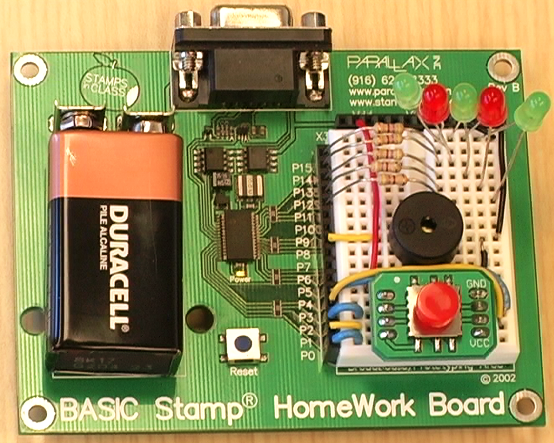
Figure 1 is the schematic and Figure 2 shows the parts placement for this circuit.

  • Build your circuit as shown below.

Figure 1 – Christmas Caroler Schematic
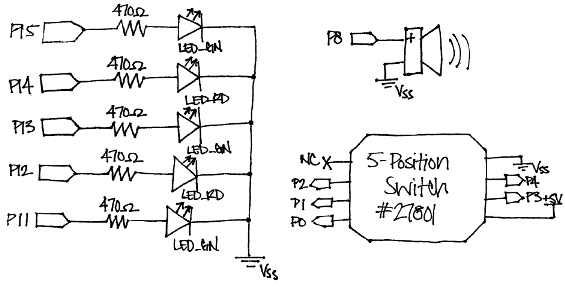
Figure 2  – Christmas Caroler Wiring Photo
 

Testing the Circuit

Once everything is wired, it’s good to be sure that everything is wired correctly. That way, you will always know that your circuit is functional, and won’t waste time trying to correct perfectly good code when the problem really lies in your wiring.

  • Unzip the project code.
  • Run TestCarolingDevice.bs2 and make sure that:
    • All LEDs turn on
    • The piezospeaker plays a tone
    • All 5 positions (up, down, left, right, and pressed) display on the Debug Terminal
' TestCarolingDevice.bs2
' Tests that the Caroling Device is wired correctly.

' {$STAMP BS2}
' {$PBASIC 2.5}

HIGH 15                       ' Turn on all LEDs
HIGH 14
HIGH 13
HIGH 12
HIGH 11

FREQOUT 8, 2000, 3000         ' Play a tone

DEBUG CLS,                    ' Display directional graph
"            ", CR,
"     |      ", CR,
"   -   -    ", CR,
"     |      ", CR

' Display which direction is pressed on the 5-Position Switch
DO
  IF (IN0 = 0) THEN DEBUG CRSRXY, 2, 2, "<" ELSE DEBUG CRSRXY, 2, 2, " "
  IF (IN1 = 0) THEN DEBUG CRSRXY, 5, 4, "v" ELSE DEBUG CRSRXY, 5, 4, " "
  IF (IN2 = 0) THEN DEBUG CRSRXY, 8, 2, ">" ELSE DEBUG CRSRXY, 8, 2, " "
  IF (IN3 = 0) THEN DEBUG CRSRXY, 5, 2, "o" ELSE DEBUG CRSRXY, 5, 2, " "
  IF (IN4 = 0) THEN DEBUG CRSRXY, 5, 0, "^" ELSE DEBUG CRSRXY, 5, 0, " "
  PAUSE 20
LOOP

Printer-friendly version
Playing the Carols
Next

DISCUSSION FORUMS | PARALLAX INC. STORE

About | Terms of Use | Feedback: learn@parallax.com | Copyright©Parallax Inc. 2024

© 2026 Parallax Learn • Built with GeneratePress