Skip to content
Parallax Learn

Parallax Learn

  • Welcome
  • Tutorials
        • Tutorial Series head tag

          Tutorial Series
        • Tutorial Series

          The special, classroom-ready series pages are organized collections of tutorials for our most popular hardware and/or languages. The tutorials for each topic are conveniently accessible from a single page, shown in the order it is recommended that they be completed.
        • Robotics Series Head tag

          Robotics Series
        • Robotics Series

          • Artificial Intelligence
          • Cybersecurity: Radio Data tutorialCybersecurity
          • cyber:bot + Python
          • cyber:bot + MakeCode
          • Boe-Bot Tutorial SeriesBoe-Bot
          • Arduino Shield-Bot
          • ActivityBot with C TutorialsActivityBot + C
          • ActivityBot with BlocklyProp Tutorial SeriesActivityBot + BlocklyProp
          • Scribbler 3 Tutorial SeriesScribbler 3
        • Electronics & Programming Series Head tag

          Electronics & Programming Series
          • BS2 Board of Education Tutorial SeriesBS2 Board of Education
          • Propeller C-Language BasicsPropeller C Basics
          • FLiP Try-It Kit C Tutorial SeriesFLiP Try-It Kit + C
          • FLiP Try-It Kit BlocklyProp TutorialsFLiP Try-It Kit + BlocklyProp
          • Badge WX Tutorial SeriesBadge WX
          • Propeller BlocklyProp Basics and ProjectsPropeller BlocklyProp Basics
          • View All Tutorial Series »
        • Browse Tutorials
        • Browse Tutorials

          Individual tutorials sorted by robot or kit, and language.
        • By Robot or Kit
          • ActivityBot
          • SumoBot WX
          • Boe-Bot
          • Shield-Bot
          • cyber:bot
          • Badge WX
          • ELEV-8
          • ARLO
        • By Language
        • By Language

          • Propeller C
          • Arduino
          • BlocklyProp
          • PBASIC
          • Python
          • MakeCode
          • View All Tutorials »
  • Educators
  • Reference
  • Downloads
  • Home
  • All Courses

ELEV-8 v3 Wireless Telemetry via XBee

Curriculum

  • 1 Section
  • 5 Lessons
  • Lifetime
Expand all sectionsCollapse all sections
  • ELEV-8 v3 Wireless Telemetry via XBee
    5
    • 1.0
      Hardware and Software for Telemetry
    • 1.1
      Configuring the XBee 900MHz Modules
    • 1.2
      Installing the XBee Hardware
    • 1.3
      Heat-Shrink the Base Module
    • 1.4
      Verifying the Wireless Link

Hardware and Software for Telemetry

The ELEV-8 v3’s Flight Controller has a socket that is compatible with XBee modules from Digi.  Because the radio link used by the transmitter and reciever for flying your ELEV-8 v3 operates in the 2.4 GHz band, it is important to use XBee radios that operate in a different freqency band.  In the United States, the best band for this application is the 900 MHz band (868 MHz will be required instead in some countries).  This frequency band allows both good range and data throughput.

WARNING: Do NOT attempt this with 2.4 GHz radio modules, as their signals may be detected by your quadcopter’s receiver and cause unexpected or dangerous behavior!

Hardware Needed

For this activity you will need:

  • (1) built and tested ELEV-8 v3 Quadcopter (Parallax #80300)
  • (1) ELEV-8 900 MHz Telemetry Kit (Parallax #32480)
  • (Optional) 2 inches of 1.5-inch diameter clear heat-shrink tubing

If you wish to source telemetry parts individually, you will need the following:
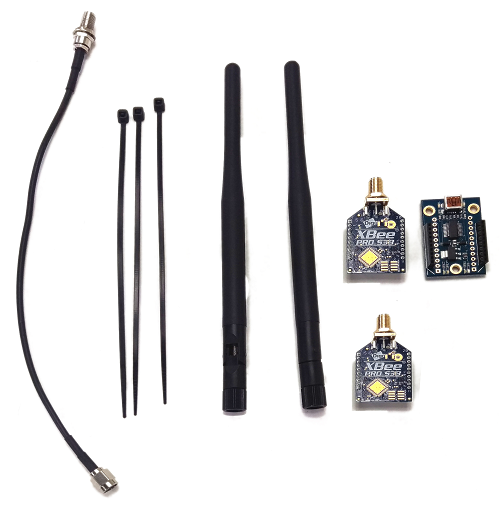
 

  • (2) XBee-PRO 900HP SB3 DigiMesh Module (XBP9B-DMST-002) (Item #32411)
  • (2) Digi 900 MHz RPSMA Antenna, Female (A09-HASM-675) (Item #32410)
  • (1) Parallax XBee USB Adapter Board (Item #32400)
  • (1) USB A to USB Mini-B Cable (Item #805-00006)
  • (2-3) Small zip-ties
  • (Optional, but recommended) a 6-8 inch RP-SMA (reverse polarity SMA) extension cable
  • (Optional) 2 inches of 1.5-inch diameter clear heat-shrink tubing

Software Needed

  • Download and install the XCTU Configuation Tool from Digi.
  • Make sure that you have installed the latest compatible versions of the Parallax GroundStation Software for Windows or for Mac and the ELEV-8 Flight Controller firmware.
  • If you have never connected your Flight Controller to this specific computer before, you may need to install FTDI VCP Drivers for your specific operating system before connecting any hardware.

Printer-friendly version
Configuring the XBee 900MHz Modules
Next

DISCUSSION FORUMS | PARALLAX INC. STORE

About | Terms of Use | Feedback: learn@parallax.com | Copyright©Parallax Inc. 2024

© 2026 Parallax Learn • Built with GeneratePress