Skip to content
Parallax Learn

Parallax Learn

  • Welcome
  • Tutorials
        • Tutorial Series head tag

          Tutorial Series
        • Tutorial Series

          The special, classroom-ready series pages are organized collections of tutorials for our most popular hardware and/or languages. The tutorials for each topic are conveniently accessible from a single page, shown in the order it is recommended that they be completed.
        • Robotics Series Head tag

          Robotics Series
        • Robotics Series

          • Artificial Intelligence
          • Cybersecurity: Radio Data tutorialCybersecurity
          • cyber:bot + Python
          • cyber:bot + MakeCode
          • Boe-Bot Tutorial SeriesBoe-Bot
          • Arduino Shield-Bot
          • ActivityBot with C TutorialsActivityBot + C
          • ActivityBot with BlocklyProp Tutorial SeriesActivityBot + BlocklyProp
          • Scribbler 3 Tutorial SeriesScribbler 3
        • Electronics & Programming Series Head tag

          Electronics & Programming Series
          • BS2 Board of Education Tutorial SeriesBS2 Board of Education
          • Propeller C-Language BasicsPropeller C Basics
          • FLiP Try-It Kit C Tutorial SeriesFLiP Try-It Kit + C
          • FLiP Try-It Kit BlocklyProp TutorialsFLiP Try-It Kit + BlocklyProp
          • Badge WX Tutorial SeriesBadge WX
          • Propeller BlocklyProp Basics and ProjectsPropeller BlocklyProp Basics
          • View All Tutorial Series »
        • Browse Tutorials
        • Browse Tutorials

          Individual tutorials sorted by robot or kit, and language.
        • By Robot or Kit
          • ActivityBot
          • SumoBot WX
          • Boe-Bot
          • Shield-Bot
          • cyber:bot
          • Badge WX
          • ELEV-8
          • ARLO
        • By Language
        • By Language

          • Propeller C
          • Arduino
          • BlocklyProp
          • PBASIC
          • Python
          • MakeCode
          • View All Tutorials »
  • Educators
  • Reference
  • Downloads
  • Home
  • All Courses

Light it Up! with WS2812 LEDs and Blockly

Curriculum

  • 1 Section
  • 1 Lesson
  • Lifetime
Expand all sectionsCollapse all sections
  • Light it Up! with WS2812 LEDs and Blockly
    1
    • 1.0
      ColorPal Sensor and WS2812 Color Display

ColorPal Sensor and WS2812 Color Display

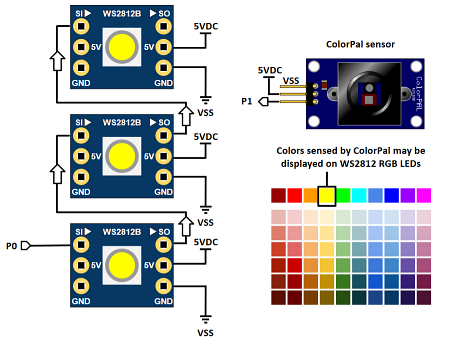
The ColorPal and WS2812 RGB LED blocks were both designed to combine all red, green and blue color values into a single 24-bit number. While the individual red, green and blue components may also be captured individually, it’s really easy to use these two blocks together with one variable named color.

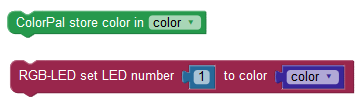
Simply sense the color with the ColorPal, save it in a variable, and output it on the WS2812 RGB LEDs.
Color sorting has many applications beyond putting Skittles in the right cup like our Color Candy Sorter Project. Identifying fruit colors, color paint chip matching, robot navigation, and industrial automation are typical uses for sensors like the ColorPal.  

Parts List

  • (3 or more) – WS2812 RGB LED (#28085)
  • (1) – ColorPal (#28380)
  • (assorted) color sample swatches
  • FLiP Module or Propeller Activity Board (original or WX)


I/O Connections

  • Propeller P0 to #1 WS2812 RGB LED SI (Serial In)
  • First RGB LED’s SO (serial out) to second RGB LED’s SI
  • Second RGB LED SO to third RGB LED SI
  • RGB LED 5V connections to 5VDC
  • RGB LED GND connections to Propeller FLiP module GND pin
  • ColorPal signal pin to Propeller P1
  • ColorPal +5V to 5VDC
  • ColorPal GND to GND


Program It

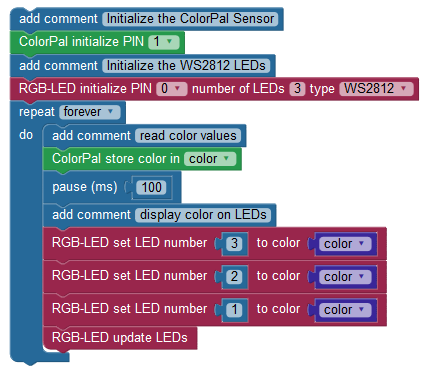
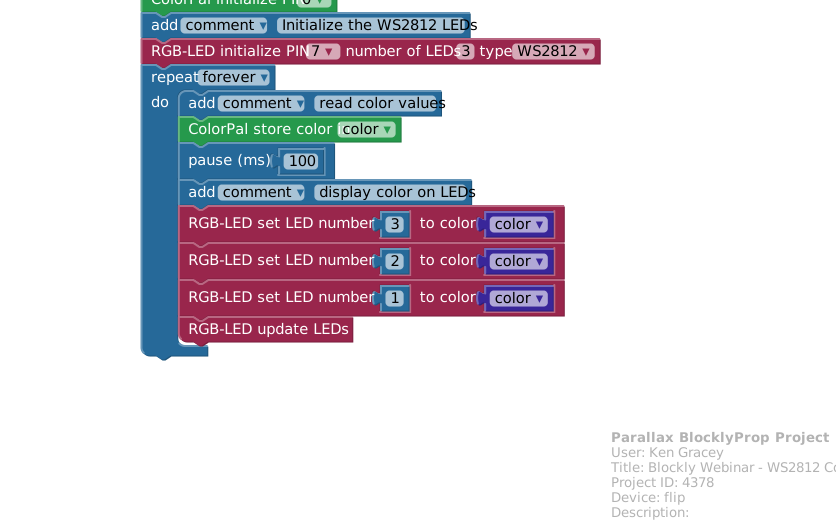
Load the ColorPal Sensor and Color Display code below and try it out. This Blockly code is simple enough to explain itself, yet the omission of any block of code would cause it not to work. Test it with fruit, paper, a smartphone, and book covers by placing your color samples in front of the ColorPal sensor.    

Project4378-WS2812-ColorPal-And-Display.svg


Printer-friendly version

DISCUSSION FORUMS | PARALLAX INC. STORE

About | Terms of Use | Feedback: learn@parallax.com | Copyright©Parallax Inc. 2024

© 2026 Parallax Learn • Built with GeneratePress