Skip to content
Parallax Learn

Parallax Learn

  • Welcome
  • Tutorials
        • Tutorial Series head tag

          Tutorial Series
        • Tutorial Series

          The special, classroom-ready series pages are organized collections of tutorials for our most popular hardware and/or languages. The tutorials for each topic are conveniently accessible from a single page, shown in the order it is recommended that they be completed.
        • Robotics Series Head tag

          Robotics Series
        • Robotics Series

          • Artificial Intelligence
          • Cybersecurity: Radio Data tutorialCybersecurity
          • cyber:bot + Python
          • cyber:bot + MakeCode
          • Boe-Bot Tutorial SeriesBoe-Bot
          • Arduino Shield-Bot
          • ActivityBot with C TutorialsActivityBot + C
          • ActivityBot with BlocklyProp Tutorial SeriesActivityBot + BlocklyProp
          • Scribbler 3 Tutorial SeriesScribbler 3
        • Electronics & Programming Series Head tag

          Electronics & Programming Series
          • BS2 Board of Education Tutorial SeriesBS2 Board of Education
          • Propeller C-Language BasicsPropeller C Basics
          • FLiP Try-It Kit C Tutorial SeriesFLiP Try-It Kit + C
          • FLiP Try-It Kit BlocklyProp TutorialsFLiP Try-It Kit + BlocklyProp
          • Badge WX Tutorial SeriesBadge WX
          • Propeller BlocklyProp Basics and ProjectsPropeller BlocklyProp Basics
          • View All Tutorial Series »
        • Browse Tutorials
        • Browse Tutorials

          Individual tutorials sorted by robot or kit, and language.
        • By Robot or Kit
          • ActivityBot
          • SumoBot WX
          • Boe-Bot
          • Shield-Bot
          • cyber:bot
          • Badge WX
          • ELEV-8
          • ARLO
        • By Language
        • By Language

          • Propeller C
          • Arduino
          • BlocklyProp
          • PBASIC
          • Python
          • MakeCode
          • View All Tutorials »
  • Educators
  • Reference
  • Downloads
  • Home
  • All Courses

Taco Pinata Project

Curriculum

  • 1 Section
  • 3 Lessons
  • Lifetime
Expand all sectionsCollapse all sections
  • Taco Pinata Project
    3
    • 1.0
      Set Up the Locomotion
    • 1.1
      Mount Remaining Parts to the Piñata
    • 1.2
      Decorate and Program

Decorate and Program

Step 7 – Adding Teeth, Legs, and Eyeballs (Optional, but definitely recommended!)
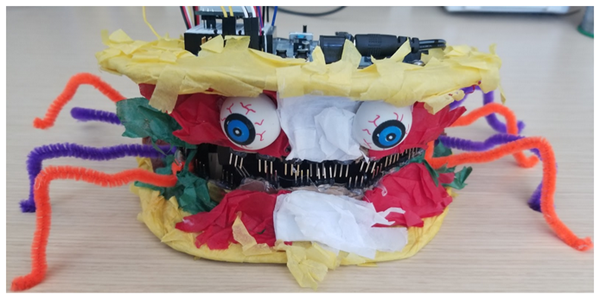
To give the piñata taco some character and personality, I gave it state-of-the-art facial reconstruction by gluing on legs, teeth, and eyeballs. You can be as creative here as you want!

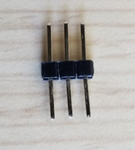
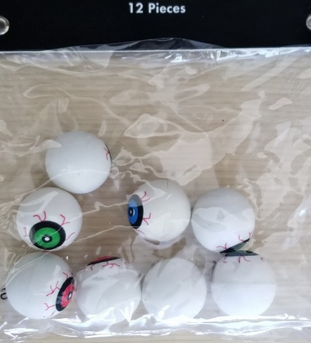
In my case I used as many 3-pin headers as I could fit in the mouth, and two eyes from a package of inexpensive spooky plastic eyeballs. I used pipe cleaners for the legs and I decided to shape them to resemble ones you might see on a spider.
 

Step 8 – Programming

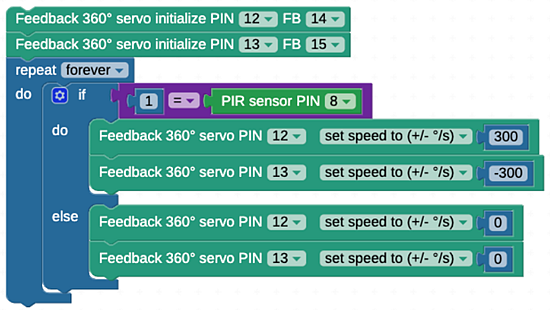
This project is coded entirely with BlocklyProp Solo, a free, online visual programming tool

If you are new to BlocklyProp programm, see the Getting Started with BlocklyProp Solo tutorial.

  • Upload the code blocks provided in the download below or re-create the program in a new project file.

Taco Piñata BlocklyProp Code Blocks


Printer-friendly version
Mount Remaining Parts to the Piñata
Prev

DISCUSSION FORUMS | PARALLAX INC. STORE

About | Terms of Use | Feedback: learn@parallax.com | Copyright©Parallax Inc. 2024

© 2026 Parallax Learn • Built with GeneratePress