Skip to content
Parallax Learn

Parallax Learn

  • Welcome
  • Tutorials
        • Tutorial Series head tag

          Tutorial Series
        • Tutorial Series

          The special, classroom-ready series pages are organized collections of tutorials for our most popular hardware and/or languages. The tutorials for each topic are conveniently accessible from a single page, shown in the order it is recommended that they be completed.
        • Robotics Series Head tag

          Robotics Series
        • Robotics Series

          • Artificial Intelligence
          • Cybersecurity: Radio Data tutorialCybersecurity
          • cyber:bot + Python
          • cyber:bot + MakeCode
          • Boe-Bot Tutorial SeriesBoe-Bot
          • Arduino Shield-Bot
          • ActivityBot with C TutorialsActivityBot + C
          • ActivityBot with BlocklyProp Tutorial SeriesActivityBot + BlocklyProp
          • Scribbler 3 Tutorial SeriesScribbler 3
        • Electronics & Programming Series Head tag

          Electronics & Programming Series
          • BS2 Board of Education Tutorial SeriesBS2 Board of Education
          • Propeller C-Language BasicsPropeller C Basics
          • FLiP Try-It Kit C Tutorial SeriesFLiP Try-It Kit + C
          • FLiP Try-It Kit BlocklyProp TutorialsFLiP Try-It Kit + BlocklyProp
          • Badge WX Tutorial SeriesBadge WX
          • Propeller BlocklyProp Basics and ProjectsPropeller BlocklyProp Basics
          • View All Tutorial Series »
        • Browse Tutorials
        • Browse Tutorials

          Individual tutorials sorted by robot or kit, and language.
        • By Robot or Kit
          • ActivityBot
          • SumoBot WX
          • Boe-Bot
          • Shield-Bot
          • cyber:bot
          • Badge WX
          • ELEV-8
          • ARLO
        • By Language
        • By Language

          • Propeller C
          • Arduino
          • BlocklyProp
          • PBASIC
          • Python
          • MakeCode
          • View All Tutorials »
  • Educators
  • Reference
  • Downloads
  • Home
  • All Courses

Taco Pinata Project

Curriculum

  • 1 Section
  • 3 Lessons
  • Lifetime
Expand all sectionsCollapse all sections
  • Taco Pinata Project
    3
    • 1.0
      Set Up the Locomotion
    • 1.1
      Mount Remaining Parts to the Piñata
    • 1.2
      Decorate and Program

Mount Remaining Parts to the Piñata

Step 3 – Cutting Slots for the Wheels

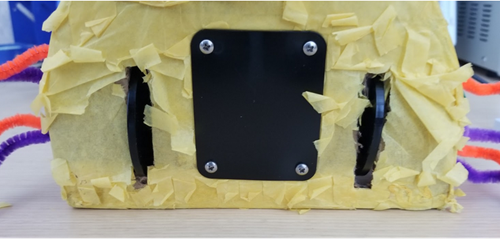
  • Cut two slots onto the bottom of the piñata to let the servo wheels access the floor.

The slots are about a ¼” wide and about 2” long however, they don’t have to be exact. The most important part is to cut slots wide and long enough to let your wheels to move freely. The picture below illustrates how the wheels of the servos are supposed to look once the servos are fully installed onto the piñata. NOTE: If you didn’t laser cut custom parts it’s ok to simply glue the servo platform onto the piñata’s cardboard.
 

Step 4 – Cutting a Wire Hole/Mounting the Activity Board

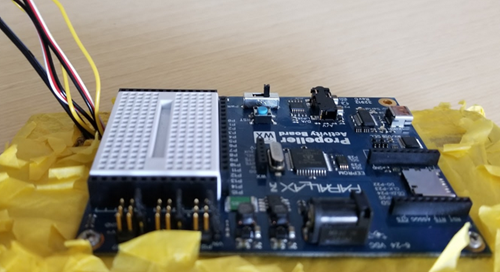
  • Cut a hole into one of the upper corners of the taco to run all the wiring through it.
  • Mount the Activity Board onto the top cardboard with screws. I used two # 4-40 pan head screws and two #4-40 nuts to hold down the board.
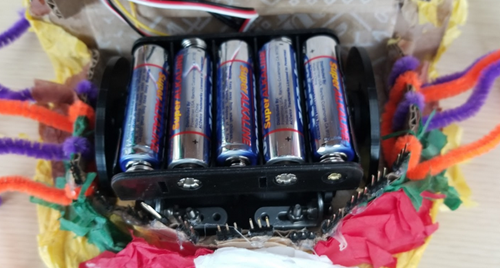
  • Glue down the battery holder to the top of the two servos and run its wire harness through wire hole.
 

Step 5  –  Install the PIR

  • Install the motion sensor by placing it into the white breadboard as shown in the picture below.
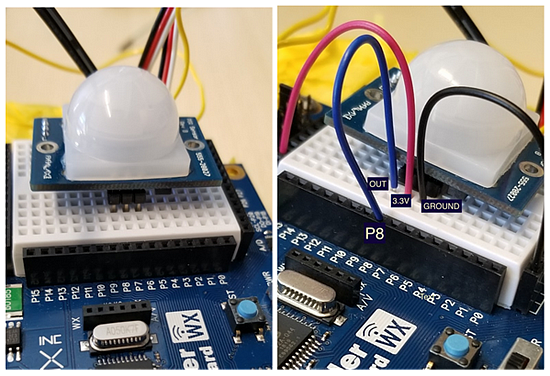
  • Connect a jumper wire from the PIR’s VCC pin (middle pin) to 3.3V.
  • Connect the ground pin to a GND socket located on the row of headers below the breadboard.
  • Connect the OUT pin to P8.


Step 6 – Connecting Servo Motors and Power
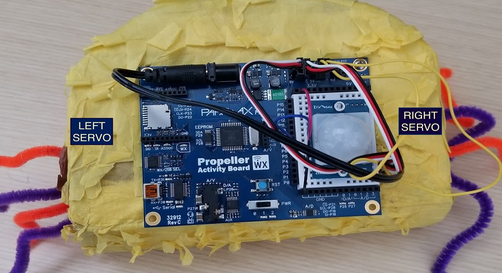
Left:

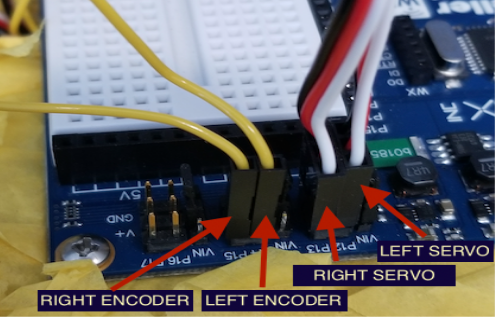
  • Left Servo connects to servo header P12.
  • Left Encoder wire (yellow wire) connects to servo header P14.

Right:

  • Right Servo connects to servo header P13.
  • Right Encoder (yellow wire) connects to servo header P15.


Printer-friendly version
Set Up the Locomotion
Prev
Decorate and Program
Next

DISCUSSION FORUMS | PARALLAX INC. STORE

About | Terms of Use | Feedback: learn@parallax.com | Copyright©Parallax Inc. 2024

© 2026 Parallax Learn • Built with GeneratePress