Skip to content
Parallax Learn

Parallax Learn

  • Welcome
  • Tutorials
        • Tutorial Series head tag

          Tutorial Series
        • Tutorial Series

          The special, classroom-ready series pages are organized collections of tutorials for our most popular hardware and/or languages. The tutorials for each topic are conveniently accessible from a single page, shown in the order it is recommended that they be completed.
        • Robotics Series Head tag

          Robotics Series
        • Robotics Series

          • Artificial Intelligence
          • Cybersecurity: Radio Data tutorialCybersecurity
          • cyber:bot + Python
          • cyber:bot + MakeCode
          • Boe-Bot Tutorial SeriesBoe-Bot
          • Arduino Shield-Bot
          • ActivityBot with C TutorialsActivityBot + C
          • ActivityBot with BlocklyProp Tutorial SeriesActivityBot + BlocklyProp
          • Scribbler 3 Tutorial SeriesScribbler 3
        • Electronics & Programming Series Head tag

          Electronics & Programming Series
          • BS2 Board of Education Tutorial SeriesBS2 Board of Education
          • Propeller C-Language BasicsPropeller C Basics
          • FLiP Try-It Kit C Tutorial SeriesFLiP Try-It Kit + C
          • FLiP Try-It Kit BlocklyProp TutorialsFLiP Try-It Kit + BlocklyProp
          • Badge WX Tutorial SeriesBadge WX
          • Propeller BlocklyProp Basics and ProjectsPropeller BlocklyProp Basics
          • View All Tutorial Series »
        • Browse Tutorials
        • Browse Tutorials

          Individual tutorials sorted by robot or kit, and language.
        • By Robot or Kit
          • ActivityBot
          • SumoBot WX
          • Boe-Bot
          • Shield-Bot
          • cyber:bot
          • Badge WX
          • ELEV-8
          • ARLO
        • By Language
        • By Language

          • Propeller C
          • Arduino
          • BlocklyProp
          • PBASIC
          • Python
          • MakeCode
          • View All Tutorials »
  • Educators
  • Reference
  • Downloads
  • Home
  • All Courses

True Colors Interactive Art Project with the LaserPING

Curriculum

  • 1 Section
  • 2 Lessons
  • Lifetime
Expand all sectionsCollapse all sections
  • True Colors Interactive Art Project with the LaserPING
    2
    • 1.0
      Constructing the Panels
    • 1.1
      Coding for Viewer Interaction

Coding for Viewer Interaction

BlocklyProp made programming this artwork very easy. You may download the True Colors.svg file for BlocklyProp Solo, and I explain my approach below.

True Colors Artwork.svg

I decided to have four different servo configurations based on the viewer’s position. I divided the LaserPING sensor’s detection range into four zones: Far, Middle, and Near, along with a Home zone for when no viewer is detected.  I made a 6-element array for each zone, to hold the rotation angle for each of the 6 servos. 
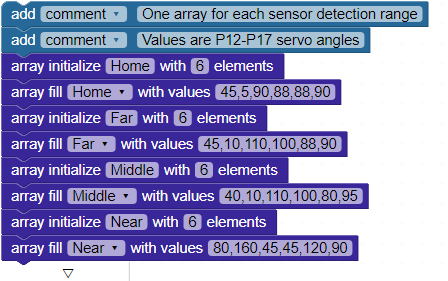
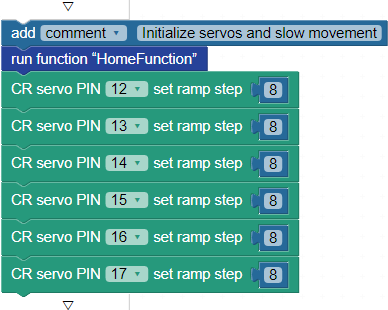
By default, the Servo PIN block will move the standard servo quite rapidly to the angle desired. I wanted a slower transition from one canvas panel arrangement to the next.  Here’s a pro tip: once you’ve made contact with a Standard servo using the Servo PIN block, you can use the CER servo PIN set ramp step block to slow down its movement from one angle setting to another.   So, to initialize the servos, I ran the Home function (we will look at those functions in a bit) and I set the ramp step for each servo to 8, much slower than the default.
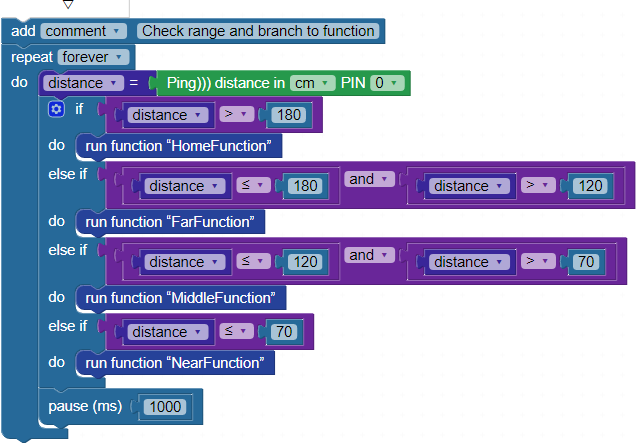
The main code is an endless loop that simply measures the distance to the nearest object in the LaserPING sensor’s range, if any, and stores that value in the distance variable.  Then, If…elseif….else compares distance to four zones   Then, the code jumps to a corresponding function, which simply sets the servo angles using the values in the matching array.  
Here is the HomeFunction code block, which uses the elements from the Home array to set the servos’ angles. In this configuration, the canvas panels are mostly lined up straight to hide all the bright colors.
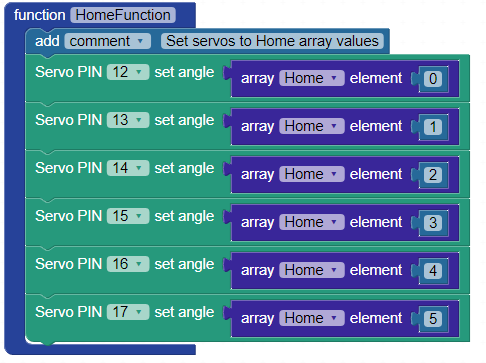
There are nearly identical blocks named FarFunction, MiddleFunction, and NearFunction, which use their namesake arrays to set their own canvas panel configurations.  The Far array values move just two servos slightly away from their Home positions, the Middle array moves two more, and the Near array has the canvas panels all rotating to expose the bright colors underneath.

Of course, this application is not much of a challenge for the Propeller Activity Board WX. I am considering adding sound next, so the viewer has something to hear as well as something to see. Stay tuned!


Printer-friendly version
Constructing the Panels
Prev

DISCUSSION FORUMS | PARALLAX INC. STORE

About | Terms of Use | Feedback: learn@parallax.com | Copyright©Parallax Inc. 2024

© 2026 Parallax Learn • Built with GeneratePress