
About Dictionaries
In Makecode, a dictionary is a collection of key-value pairs. For example {‘name’: ‘Sir Lancelot’, ‘score’ : 1000} is a dictionary that contains two key-value pairs ‘name’: ‘Sir Lancelot’ and ‘score’ : 1000. Sir Lancelot is the string value that’s paired with the ‘name’ key, and 1000 is the int value paired with the ‘score’ key.
Storing information in key-value pairs really helps when one device collects the information and then sends it to another device that processes it. The device that processes the information can use keys to get the values it needs out of the dictionary it receives.
Collections of key-value pairs are important for making data exchanges between devices more manageable. Phone and browser apps that communicate with servers make extensive use of key-value pairs. As you will soon see, it’s an essential ingredient in projects where one micro:bit sends data that another micro:bit uses to accomplish a robotic task.
The Cybersecurity tutorials make two micro:bit modules work together like a browser and server would, by using dictionaries. To get ready, this activity will guide you through some of the basics, practicing these operations on a dictionary:
- Create a dictionary
- Add key-value pairs
- Use keys to access values
First Dictionary
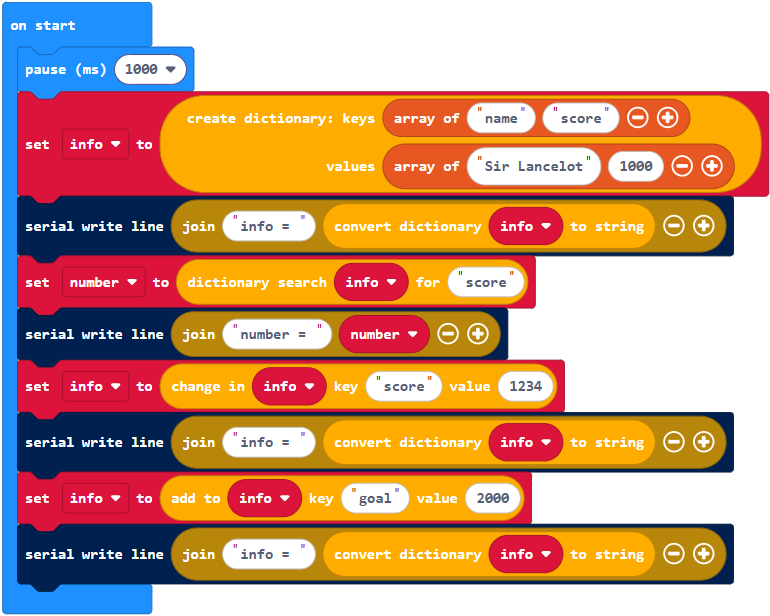
Here’s an example of a block that creates a dictionary and names it info.

The dictionary itself is {‘name’: ‘Sir Lancelot’, ‘score’ : 1000}. The dictionary has two key-value pairs. One is ‘name’: ‘Sir Lancelot’, and the other is ‘score’ : 1000}. The value paired with the ‘name’ key is ‘Sir Lancelot’. The value paired with the ‘score’ key is 1000.

A project can use a key to look up a value like this:

Since the value paired with the ‘score’ key is 1000, the number variable will now store 1000.
Adding a key to an already existing dictionary is easy. The only thing you have to do is use a key name that’s different from any of the keys that are already in the dictionary. The two keys already in the dictionary are ‘name’ and ‘score’. So, if you use a new name and assign it a value, a new key-value pair will appear in the dictionary.

Example project: first_dictionary
- Connect your micro:bit module to your computer with its USB cable.
- In a browser, go to makecode.microbit.org to open the micro:bit Makecode Editor.
- Enter and name the first_dictionary project.
(See Save & Edit Projects.) - Flash the project into the micro:bit
(See Flash Projects with MakeCode Editor.)
- Go to Google Chromelabs Serial Terminal to check the results in the serial monitor.
(See Use the Serial Monitor.) - Verify that:
- The initial dictionary print is info = {‘score’: 1000, ‘name’: ‘Sir Lancelot’}
- After changing the ‘score’ key’s value to 1234, the second dictionary print is: info = {‘score’: 1234, ‘name’: ‘Sir Lancelot’}
- After adding the ‘score’: 1234 key-value pair, the last dictionary print is: info = {‘goal’: 2000, ‘score’: 1234, ‘name’: ‘Sir Lancelot’}
