Skip to content
Parallax Learn

Parallax Learn

  • Welcome
  • Tutorials
        • Tutorial Series head tag

          Tutorial Series
        • Tutorial Series

          The special, classroom-ready series pages are organized collections of tutorials for our most popular hardware and/or languages. The tutorials for each topic are conveniently accessible from a single page, shown in the order it is recommended that they be completed.
        • Robotics Series Head tag

          Robotics Series
        • Robotics Series

          • Artificial Intelligence
          • Cybersecurity: Radio Data tutorialCybersecurity
          • cyber:bot + Python
          • cyber:bot + MakeCode
          • Boe-Bot Tutorial SeriesBoe-Bot
          • Arduino Shield-Bot
          • ActivityBot with C TutorialsActivityBot + C
          • ActivityBot with BlocklyProp Tutorial SeriesActivityBot + BlocklyProp
          • Scribbler 3 Tutorial SeriesScribbler 3
        • Electronics & Programming Series Head tag

          Electronics & Programming Series
          • BS2 Board of Education Tutorial SeriesBS2 Board of Education
          • Propeller C-Language BasicsPropeller C Basics
          • FLiP Try-It Kit C Tutorial SeriesFLiP Try-It Kit + C
          • FLiP Try-It Kit BlocklyProp TutorialsFLiP Try-It Kit + BlocklyProp
          • Badge WX Tutorial SeriesBadge WX
          • Propeller BlocklyProp Basics and ProjectsPropeller BlocklyProp Basics
          • View All Tutorial Series »
        • Browse Tutorials
        • Browse Tutorials

          Individual tutorials sorted by robot or kit, and language.
        • By Robot or Kit
          • ActivityBot
          • SumoBot WX
          • Boe-Bot
          • Shield-Bot
          • cyber:bot
          • Badge WX
          • ELEV-8
          • ARLO
        • By Language
        • By Language

          • Propeller C
          • Arduino
          • BlocklyProp
          • PBASIC
          • Python
          • MakeCode
          • View All Tutorials »
  • Educators
  • Reference
  • Downloads
  • Home
  • All Courses

(Legacy Version) Propeller C Programming with the ActivityBot

Curriculum

  • 1 Section
  • 48 Lessons
  • Lifetime
Expand all sectionsCollapse all sections
  • (Legacy Version) Propeller C Programming with the ActivityBot
    48
    • 1.1
      Mechanical Assembly
    • 1.2
      Check your Hardware
    • 1.3
      Step 1 – Prepare your Encoders
    • 1.4
      Step 2 – Prepare the Tires
    • 1.5
      Step 3 – Prepare the Chassis
    • 1.6
      Step 4 – Prepare the Servos
    • 1.7
      Step 5 – Mount the Right Servo
    • 1.8
      Step 6 – Mount the Left Servo
    • 1.9
      Step 7 – Mount the Right Encoder
    • 1.10
      Step 8 – Mount the Left Encoder
    • 1.11
      Step 9 – Mount the Battery Pack
    • 1.12
      Step 10 – Mount the Tail Wheel
    • 1.13
      Step 11 – Mount the Drive Wheels
    • 1.14
      Step 12 – Mount the Activity Board
    • 1.15
      Electrical Connections
    • 1.16
      Software and Programming
    • 1.17
      Circuit Practice
    • 1.18
      Powering & Connecting Circuits
    • 1.19
      Blinks
    • 1.20
      Beeps
    • 1.21
      Navigation Basics
    • 1.22
      Test Feedback 360° Servos
    • 1.23
      Calibrate Feedback 360° Encoders
    • 1.24
      Test the External Encoders
    • 1.25
      Calibrate External Encoders
    • 1.26
      Go Certain Distances
    • 1.27
      Set Certain Speeds
    • 1.28
      Navigate by Touch
    • 1.29
      Build the Whiskers
    • 1.30
      Test the Whiskers
    • 1.31
      Inside the Whisker Circuit (Optional)
    • 1.32
      Add Whisker Indicator Lights
    • 1.33
      Whisker-Wheel Response
    • 1.34
      Roaming with Whiskers
    • 1.35
      Navigate by Ultrasound
    • 1.36
      Build and Test the Ping))) Sensor Circuit
    • 1.37
      Roaming with Ultrasound
    • 1.38
      Follow Objects with Ultrasound
    • 1.39
      Navigate by Visible Light
    • 1.40
      Build the Light Sensor Circuits
    • 1.41
      Using the Measurements
    • 1.42
      Roaming with Light Sensors
    • 1.43
      Navigate by Infrared Flashlights
    • 1.44
      Build the IR Sensor Circuits
    • 1.45
      Test the IR Sensor Circuits
    • 1.46
      Roaming with Infrared Flashlights
    • 1.47
      Extras
    • 1.48
      Troubleshooting

Blinks

Next, let’s test-drive two built-in light circuits on your Activity Board.

Your Activity Board (original and WX version) has two built-in lights, near the bottom-right corner of the board. These tiny light-emitting diodes (LEDs) are already electrically connected to I/O pins P26 and P27.  These LEDs are helpful when developing applications that use sensors. The idea is to write your program so that if a sensor is activated, an LED lights up to give you, the roboticist, a quick visual cue that the sensor is actually detecting something. 
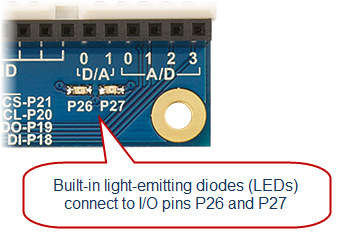
The Simple Circuits tutorial has an example program for blinking these LEDs.

  • Go try the Blink a Light tutorial, then come back here when you are done.

Welcome back!

  • Follow the links below to continue with the ActivityBot tutorials.


Printer-friendly version
Powering & Connecting Circuits
Prev
Beeps
Next

DISCUSSION FORUMS | PARALLAX INC. STORE

About | Terms of Use | Feedback: learn@parallax.com | Copyright©Parallax Inc. 2024

© 2026 Parallax Learn • Built with GeneratePress