Skip to content
Parallax Learn

Parallax Learn

  • Welcome
  • Tutorials
        • Tutorial Series head tag

          Tutorial Series
        • Tutorial Series

          The special, classroom-ready series pages are organized collections of tutorials for our most popular hardware and/or languages. The tutorials for each topic are conveniently accessible from a single page, shown in the order it is recommended that they be completed.
        • Robotics Series Head tag

          Robotics Series
        • Robotics Series

          • Artificial Intelligence
          • Cybersecurity: Radio Data tutorialCybersecurity
          • cyber:bot + Python
          • cyber:bot + MakeCode
          • Boe-Bot Tutorial SeriesBoe-Bot
          • Arduino Shield-Bot
          • ActivityBot with C TutorialsActivityBot + C
          • ActivityBot with BlocklyProp Tutorial SeriesActivityBot + BlocklyProp
          • Scribbler 3 Tutorial SeriesScribbler 3
        • Electronics & Programming Series Head tag

          Electronics & Programming Series
          • BS2 Board of Education Tutorial SeriesBS2 Board of Education
          • Propeller C-Language BasicsPropeller C Basics
          • FLiP Try-It Kit C Tutorial SeriesFLiP Try-It Kit + C
          • FLiP Try-It Kit BlocklyProp TutorialsFLiP Try-It Kit + BlocklyProp
          • Badge WX Tutorial SeriesBadge WX
          • Propeller BlocklyProp Basics and ProjectsPropeller BlocklyProp Basics
          • View All Tutorial Series »
        • Browse Tutorials
        • Browse Tutorials

          Individual tutorials sorted by robot or kit, and language.
        • By Robot or Kit
          • ActivityBot
          • SumoBot WX
          • Boe-Bot
          • Shield-Bot
          • cyber:bot
          • Badge WX
          • ELEV-8
          • ARLO
        • By Language
        • By Language

          • Propeller C
          • Arduino
          • BlocklyProp
          • PBASIC
          • Python
          • MakeCode
          • View All Tutorials »
  • Educators
  • Reference
  • Downloads
  • Home
  • All Courses

(Legacy Version) Propeller C Programming with the ActivityBot

Curriculum

  • 1 Section
  • 48 Lessons
  • Lifetime
Expand all sectionsCollapse all sections
  • (Legacy Version) Propeller C Programming with the ActivityBot
    48
    • 1.1
      Mechanical Assembly
    • 1.2
      Check your Hardware
    • 1.3
      Step 1 – Prepare your Encoders
    • 1.4
      Step 2 – Prepare the Tires
    • 1.5
      Step 3 – Prepare the Chassis
    • 1.6
      Step 4 – Prepare the Servos
    • 1.7
      Step 5 – Mount the Right Servo
    • 1.8
      Step 6 – Mount the Left Servo
    • 1.9
      Step 7 – Mount the Right Encoder
    • 1.10
      Step 8 – Mount the Left Encoder
    • 1.11
      Step 9 – Mount the Battery Pack
    • 1.12
      Step 10 – Mount the Tail Wheel
    • 1.13
      Step 11 – Mount the Drive Wheels
    • 1.14
      Step 12 – Mount the Activity Board
    • 1.15
      Electrical Connections
    • 1.16
      Software and Programming
    • 1.17
      Circuit Practice
    • 1.18
      Powering & Connecting Circuits
    • 1.19
      Blinks
    • 1.20
      Beeps
    • 1.21
      Navigation Basics
    • 1.22
      Test Feedback 360° Servos
    • 1.23
      Calibrate Feedback 360° Encoders
    • 1.24
      Test the External Encoders
    • 1.25
      Calibrate External Encoders
    • 1.26
      Go Certain Distances
    • 1.27
      Set Certain Speeds
    • 1.28
      Navigate by Touch
    • 1.29
      Build the Whiskers
    • 1.30
      Test the Whiskers
    • 1.31
      Inside the Whisker Circuit (Optional)
    • 1.32
      Add Whisker Indicator Lights
    • 1.33
      Whisker-Wheel Response
    • 1.34
      Roaming with Whiskers
    • 1.35
      Navigate by Ultrasound
    • 1.36
      Build and Test the Ping))) Sensor Circuit
    • 1.37
      Roaming with Ultrasound
    • 1.38
      Follow Objects with Ultrasound
    • 1.39
      Navigate by Visible Light
    • 1.40
      Build the Light Sensor Circuits
    • 1.41
      Using the Measurements
    • 1.42
      Roaming with Light Sensors
    • 1.43
      Navigate by Infrared Flashlights
    • 1.44
      Build the IR Sensor Circuits
    • 1.45
      Test the IR Sensor Circuits
    • 1.46
      Roaming with Infrared Flashlights
    • 1.47
      Extras
    • 1.48
      Troubleshooting

Test the External Encoders

Only for External Encoders!
If you are using Feedback 360° servos, go to Feedback 360° Servo Test instead.

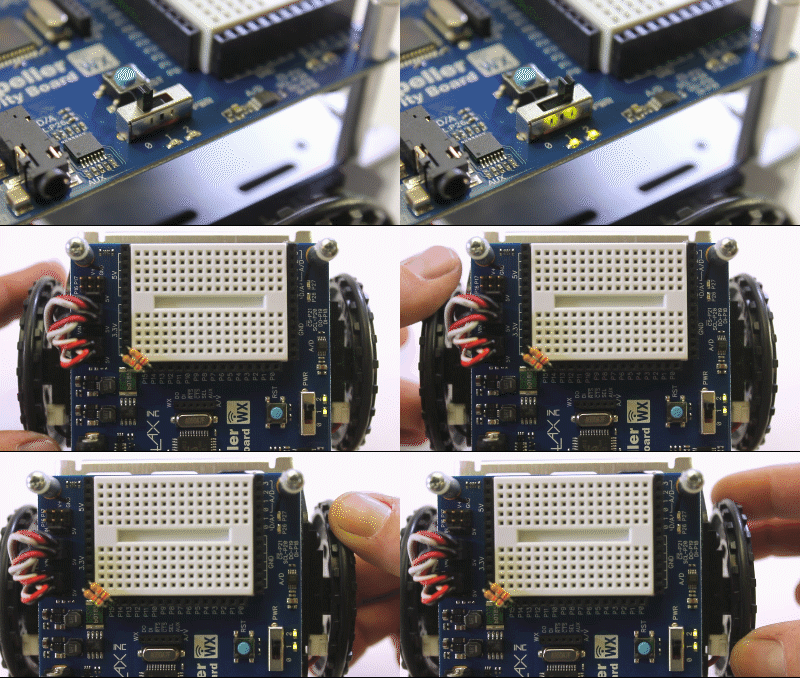
This short test program makes sure each encoder sensor can see the spokes in the wheel right next to it.  If the encoder is working properly, a built-in LED on the board will light up each time it detects a spoke, and go off when the hole between the spokes passes by.

  • Browse to DocumentsSimpleIDELearnExamplesRobotsActivityBot
  • In SimpleIDE, open Test Encoder Connections.side
  • Turn the robot’s PWR switch to Position 2.
  • In SimpleIDE, click Load EEPROM & Run.
  • With your hand, gently twist the ActivityBot’s left wheel. This should make the P26 LED turn on and off as you rotate the wheel.
  • Repeat for the right wheel.  Turning the right wheel should make the P27 LED turn on and off.
 

/*
  Test Encoder Connections 
*/

#include "simpletools.h"

int main()                    
{
  low(26);
  low(27);
  while(1)
  {
    set_output(26, input(14));
    set_output(27, input(15));
  }
}


If It Doesn’t Work…

Here are some symptoms and causes:

P26 Light stays off while turning the left wheel.

  • The left encoder cable may be plugged into the P14 servo port backwards.
  • 20 k resistor (red-black-orange) may not be making contact at either the P14 or 3.3 V socket.
  • The left encoder may be mounted with the sensor facing the chassis instead of facing the wheel spokes.

P27 Light stays off while turning the left wheel.

  • The right encoder cable may be plugged into the P15 servo port backwards.
  • 20 k resistor (red-black-orange) may not be making contact at either the P15 or 3.3 V socket.
  • The right encoder may be mounted with the sensor facing the chassis instead of facing the wheel spokes.

P27 light instead of P26 light blinks while wheel turning the left wheel (or vice versa).

  • The encoder cables are swapped! Switch the encoder cables plugged into P14 and P15.

P26 or P27 light stays on while turning wheel.

  • Resistor connecting P14 or P15 socket to 3.3 V socket is too small. It should be 20 k-ohm (red-black-orange-gold). This resistor came in the bag with the encoder parts, not with the rest of the resistors in the kit.

The encoder’s light stays on all of the time, or most of the time but occasionally flickers off.

  • The encoder might be mounted so the sensor faces inward toward the chassis instead of outward toward the wheel spokes. Un-mount and swap them so they face outward.
  • You may need to adjust the servo/encoder bracket position. Make sure your servo is fairly centered in its hole, there should be a small gap above and below the servo body. Its position is easily corrected by loosening the servo screws slightly, repositioning the servo, and then re-tightening the screws.

Both P26 and P27 stay on at all times during the test

  • The jumper for P14 & P15 may be faulty, or not making proper connection. Make sure it is pressed all the way on to the pins, and that it is not cracked, loose, or otherwise damaged. If any of your jumpers are damaged, contact technical support (support@parallax.com) and do not apply power to the affected headers!


If Both Encoders Work

Congratulations! It is time to calibrate your ActivityBot.

  • Go to External Encoder Calibration.

Printer-friendly version
Calibrate Feedback 360° Encoders
Prev
Calibrate External Encoders
Next

DISCUSSION FORUMS | PARALLAX INC. STORE

About | Terms of Use | Feedback: learn@parallax.com | Copyright©Parallax Inc. 2024

© 2026 Parallax Learn • Built with GeneratePress