Skip to content
Parallax Learn

Parallax Learn

  • Welcome
  • Tutorials
        • Tutorial Series head tag

          Tutorial Series
        • Tutorial Series

          The special, classroom-ready series pages are organized collections of tutorials for our most popular hardware and/or languages. The tutorials for each topic are conveniently accessible from a single page, shown in the order it is recommended that they be completed.
        • Robotics Series Head tag

          Robotics Series
        • Robotics Series

          • Artificial Intelligence
          • Cybersecurity: Radio Data tutorialCybersecurity
          • cyber:bot + Python
          • cyber:bot + MakeCode
          • Boe-Bot Tutorial SeriesBoe-Bot
          • Arduino Shield-Bot
          • ActivityBot with C TutorialsActivityBot + C
          • ActivityBot with BlocklyProp Tutorial SeriesActivityBot + BlocklyProp
          • Scribbler 3 Tutorial SeriesScribbler 3
        • Electronics & Programming Series Head tag

          Electronics & Programming Series
          • BS2 Board of Education Tutorial SeriesBS2 Board of Education
          • Propeller C-Language BasicsPropeller C Basics
          • FLiP Try-It Kit C Tutorial SeriesFLiP Try-It Kit + C
          • FLiP Try-It Kit BlocklyProp TutorialsFLiP Try-It Kit + BlocklyProp
          • Badge WX Tutorial SeriesBadge WX
          • Propeller BlocklyProp Basics and ProjectsPropeller BlocklyProp Basics
          • View All Tutorial Series »
        • Browse Tutorials
        • Browse Tutorials

          Individual tutorials sorted by robot or kit, and language.
        • By Robot or Kit
          • ActivityBot
          • SumoBot WX
          • Boe-Bot
          • Shield-Bot
          • cyber:bot
          • Badge WX
          • ELEV-8
          • ARLO
        • By Language
        • By Language

          • Propeller C
          • Arduino
          • BlocklyProp
          • PBASIC
          • Python
          • MakeCode
          • View All Tutorials »
  • Educators
  • Reference
  • Downloads
  • Home
  • All Courses

Tilt-Controlled Gripper with the cyber:bot Robot

Curriculum

  • 1 Section
  • 14 Lessons
  • Lifetime
Expand all sectionsCollapse all sections
  • Tilt-Controlled Gripper with the cyber:bot Robot
    14
    • 1.0
      Test and Tune the Gripper
    • 1.1
      Gripper Test Project
    • 1.2
      Troubleshooting your Gripper
    • 1.3
      How The Gripper Test Works
    • 1.4
      Automatic Open and Close
    • 1.5
      Go and Get an Object
    • 1.6
      Project and Tests
    • 1.7
      How The Test Project Works
    • 1.8
      Put the Object Back
    • 1.9
      Tilt Controlled cyber:bot with Gripper Control
    • 1.10
      Project for Tilt & Grip cyber:bot
    • 1.11
      Project for Tilt & Grip Controller
    • 1.12
      Test the Tilt-Controlled Gripper
    • 1.13
      Tune and Organize the Project Code

How The Test Project Works

How cyber_bot_gripper_forward_object Works

After importing the cyberbot module, the project begins to constantly monitor the tilt micro:bit module’s B button.
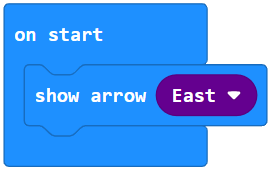
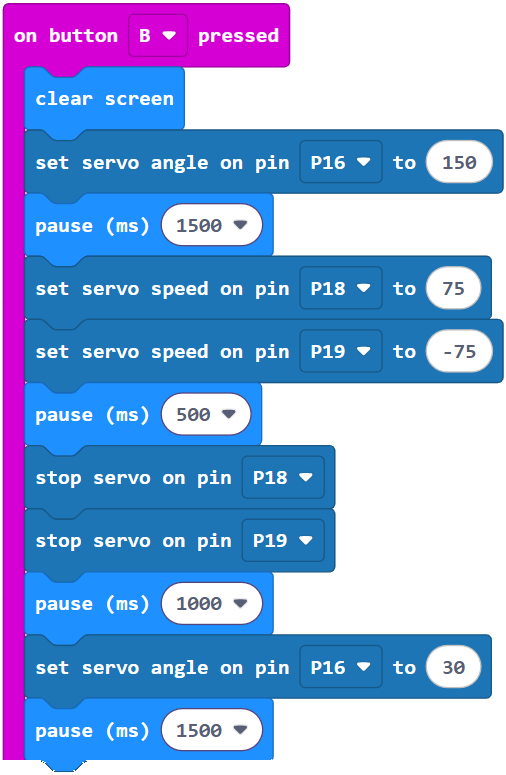
If the B button was pressed, the cyber:bot starts by rolling forward for ½ a second, then stops. The routine is appended with a pause (1000) block to make sure the cyber:bot has completely come to rest. Once at full stop, the project uses (Pin16) servo angle (30) to close the Gripper. It is followed by pause (1500) to give the Gripper paddles time to close and lift, and partially to make a slight pause between picking up the object and starting to move.
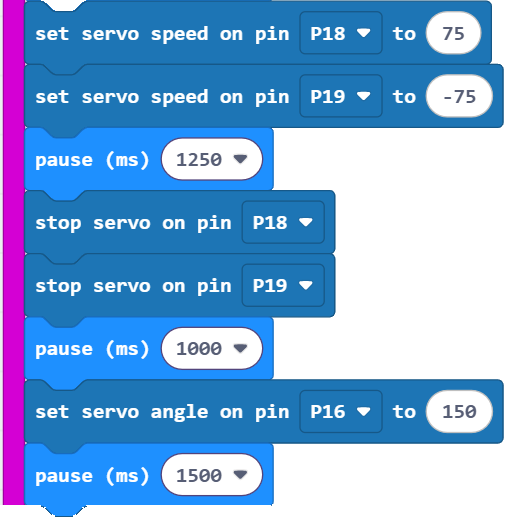
After lifting the object, this part of the project makes the cyber:bot roll forward for 1.25 s. Then, it lowers and opens the Gripper paddles, setting down the object.
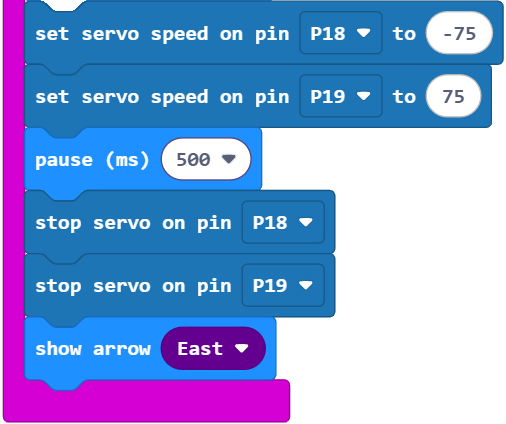
Finally, it backs up for 0.5 s so that the object is no longer between the Gripper paddles.

Printer-friendly version
Project and Tests
Prev
Put the Object Back
Next

DISCUSSION FORUMS | PARALLAX INC. STORE

About | Terms of Use | Feedback: learn@parallax.com | Copyright©Parallax Inc. 2024

© 2026 Parallax Learn • Built with GeneratePress