Skip to content
Parallax Learn

Parallax Learn

  • Welcome
  • Tutorials
        • Tutorial Series head tag

          Tutorial Series
        • Tutorial Series

          The special, classroom-ready series pages are organized collections of tutorials for our most popular hardware and/or languages. The tutorials for each topic are conveniently accessible from a single page, shown in the order it is recommended that they be completed.
        • Robotics Series Head tag

          Robotics Series
        • Robotics Series

          • Artificial Intelligence
          • Cybersecurity: Radio Data tutorialCybersecurity
          • cyber:bot + Python
          • cyber:bot + MakeCode
          • Boe-Bot Tutorial SeriesBoe-Bot
          • Arduino Shield-Bot
          • ActivityBot with C TutorialsActivityBot + C
          • ActivityBot with BlocklyProp Tutorial SeriesActivityBot + BlocklyProp
          • Scribbler 3 Tutorial SeriesScribbler 3
        • Electronics & Programming Series Head tag

          Electronics & Programming Series
          • BS2 Board of Education Tutorial SeriesBS2 Board of Education
          • Propeller C-Language BasicsPropeller C Basics
          • FLiP Try-It Kit C Tutorial SeriesFLiP Try-It Kit + C
          • FLiP Try-It Kit BlocklyProp TutorialsFLiP Try-It Kit + BlocklyProp
          • Badge WX Tutorial SeriesBadge WX
          • Propeller BlocklyProp Basics and ProjectsPropeller BlocklyProp Basics
          • View All Tutorial Series »
        • Browse Tutorials
        • Browse Tutorials

          Individual tutorials sorted by robot or kit, and language.
        • By Robot or Kit
          • ActivityBot
          • SumoBot WX
          • Boe-Bot
          • Shield-Bot
          • cyber:bot
          • Badge WX
          • ELEV-8
          • ARLO
        • By Language
        • By Language

          • Propeller C
          • Arduino
          • BlocklyProp
          • PBASIC
          • Python
          • MakeCode
          • View All Tutorials »
  • Educators
  • Reference
  • Downloads
  • Home
  • All Courses

Exception Handling Primer

Curriculum

  • 1 Section
  • 9 Lessons
  • Lifetime
Expand all sectionsCollapse all sections
  • Exception Handling Primer
    9
    • 1.0
      Exceptions and Exception Handling
    • 1.1
      Make a Script Handle Exceptions
    • 1.2
      How it Works, and Breaks
    • 1.3
      Try This: Add Exception Handler
    • 1.4
      Your Turn: Coder-Friendly Hints
    • 1.5
      Make an App that Won’t Freeze
    • 1.6
      How it Works: ValueError
    • 1.7
      Try This: Add Exception Handler for User Errors
    • 1.8
      Your Turn: User-Friendly Hints

Your Turn: User-Friendly Hints

Now that you know what exception types to expect, you can modify your application to handle each one by responding with helpful user prompts. Your customers will thank you one day!

  • Change project’s name from  exceptions_user_division_calc_try_this to exceptions_user_division_calc_your_turn.
  • Change the except block from this:
 except Exception as e:
        print("Exception = ", e)
        et = type(e)
        print("Exception type = ", et)

…to this:

    except (TypeError, ValueError):                  
        print("Expected a number.")

    except ZeroDivisionError:
        print("Can't divide by zero.")
  • Save the modified script.
  • Click the Send to micro:bit button.
     
  • In the serial monitor, click to the left of the Enter numerator n: prompt.
  • Test the responses to each exception you can create, including entering zero for the denominator, typing “Hello” instead of a number, and so on.
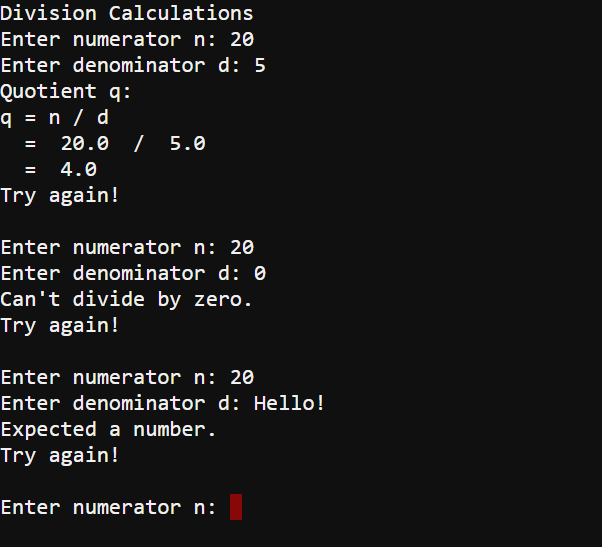
    • Now imagine you are using this app without knowing how to write code. Isn’t this an improvement?


    Printer-friendly version
    Try This: Add Exception Handler for User Errors
    Prev

    DISCUSSION FORUMS | PARALLAX INC. STORE

    About | Terms of Use | Feedback: learn@parallax.com | Copyright©Parallax Inc. 2024

    © 2026 Parallax Learn • Built with GeneratePress