Skip to content
Parallax Learn

Parallax Learn

  • Welcome
  • Tutorials
        • Tutorial Series head tag

          Tutorial Series
        • Tutorial Series

          The special, classroom-ready series pages are organized collections of tutorials for our most popular hardware and/or languages. The tutorials for each topic are conveniently accessible from a single page, shown in the order it is recommended that they be completed.
        • Robotics Series Head tag

          Robotics Series
        • Robotics Series

          • Artificial Intelligence
          • Cybersecurity: Radio Data tutorialCybersecurity
          • cyber:bot + Python
          • cyber:bot + MakeCode
          • Boe-Bot Tutorial SeriesBoe-Bot
          • Arduino Shield-Bot
          • ActivityBot with C TutorialsActivityBot + C
          • ActivityBot with BlocklyProp Tutorial SeriesActivityBot + BlocklyProp
          • Scribbler 3 Tutorial SeriesScribbler 3
        • Electronics & Programming Series Head tag

          Electronics & Programming Series
          • BS2 Board of Education Tutorial SeriesBS2 Board of Education
          • Propeller C-Language BasicsPropeller C Basics
          • FLiP Try-It Kit C Tutorial SeriesFLiP Try-It Kit + C
          • FLiP Try-It Kit BlocklyProp TutorialsFLiP Try-It Kit + BlocklyProp
          • Badge WX Tutorial SeriesBadge WX
          • Propeller BlocklyProp Basics and ProjectsPropeller BlocklyProp Basics
          • View All Tutorial Series »
        • Browse Tutorials
        • Browse Tutorials

          Individual tutorials sorted by robot or kit, and language.
        • By Robot or Kit
          • ActivityBot
          • SumoBot WX
          • Boe-Bot
          • Shield-Bot
          • cyber:bot
          • Badge WX
          • ELEV-8
          • ARLO
        • By Language
        • By Language

          • Propeller C
          • Arduino
          • BlocklyProp
          • PBASIC
          • Python
          • MakeCode
          • View All Tutorials »
  • Educators
  • Reference
  • Downloads
  • Home
  • All Courses

Exception Handling Primer

Curriculum

  • 1 Section
  • 9 Lessons
  • Lifetime
Expand all sectionsCollapse all sections
  • Exception Handling Primer
    9
    • 1.0
      Exceptions and Exception Handling
    • 1.1
      Make a Script Handle Exceptions
    • 1.2
      How it Works, and Breaks
    • 1.3
      Try This: Add Exception Handler
    • 1.4
      Your Turn: Coder-Friendly Hints
    • 1.5
      Make an App that Won’t Freeze
    • 1.6
      How it Works: ValueError
    • 1.7
      Try This: Add Exception Handler for User Errors
    • 1.8
      Your Turn: User-Friendly Hints

Make a Script Handle Exceptions

In this activity, you will start with a working script and then modify it to cause an exception.  As usual, the script will halt when it reaches the statement that causes the exception.  You will then add statements to “handle” the exception and prevent the program from halting.  Finally, you will add statements that display more helpful messages.

Example script: exceptions_division_calc

  • Connect your micro:bit module to your computer with its USB cable.
  • In a Google Chrome or Microsoft Edge browser, go to python.microbit.org to open the micro:bit Python Editor.
  • Enter, name, and save exceptions_division_calc.
    (See Save & Edit Scripts.)  
  • Click Send to micro:bit.
    (See Flash Scripts with Python Editor.)
# exceptions_division_calc

from microbit import *

sleep(1000)

print("Division Calculation")

n = 20
d = 5

q = n / d

print("q = n / d")
print("  = ", n, " / ", d)
print("  = ", q)
print("Try again!")
print()
  • If it’s not already open, click Show serial to open the serial monitor.
    (See Use the Serial Monitor.)
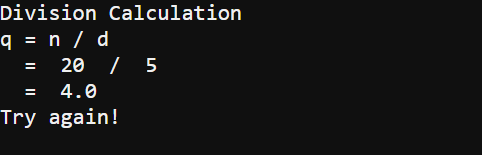
  • Verify that your serial monitor response is consistent with your input. It should look something like the image below. (Push the reset button on the underside of the micro:bit if you need the code to repeat to see the enteire message.)
Now let’s break the script!

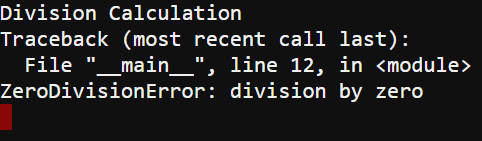
  • Modify the script to set d equal to zero, like this:
    d = 0
  • Flash the modified script, and verify that you now get an error report like this one:
 

Let’s break it a different way!

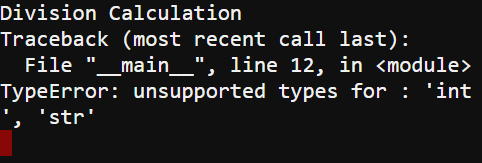
  • Modify the script again so d is set equal to Hello, like this:
    d = “Hello!”
  • Re-flash the script again and verify that you now see a different error reported in the terminal:


Printer-friendly version
Exceptions and Exception Handling
Prev
How it Works, and Breaks
Next

DISCUSSION FORUMS | PARALLAX INC. STORE

About | Terms of Use | Feedback: learn@parallax.com | Copyright©Parallax Inc. 2024

© 2026 Parallax Learn • Built with GeneratePress