Skip to content
Parallax Learn

Parallax Learn

  • Welcome
  • Tutorials
        • Tutorial Series head tag

          Tutorial Series
        • Tutorial Series

          The special, classroom-ready series pages are organized collections of tutorials for our most popular hardware and/or languages. The tutorials for each topic are conveniently accessible from a single page, shown in the order it is recommended that they be completed.
        • Robotics Series Head tag

          Robotics Series
        • Robotics Series

          • Artificial Intelligence
          • Cybersecurity: Radio Data tutorialCybersecurity
          • cyber:bot + Python
          • cyber:bot + MakeCode
          • Boe-Bot Tutorial SeriesBoe-Bot
          • Arduino Shield-Bot
          • ActivityBot with C TutorialsActivityBot + C
          • ActivityBot with BlocklyProp Tutorial SeriesActivityBot + BlocklyProp
          • Scribbler 3 Tutorial SeriesScribbler 3
        • Electronics & Programming Series Head tag

          Electronics & Programming Series
          • BS2 Board of Education Tutorial SeriesBS2 Board of Education
          • Propeller C-Language BasicsPropeller C Basics
          • FLiP Try-It Kit C Tutorial SeriesFLiP Try-It Kit + C
          • FLiP Try-It Kit BlocklyProp TutorialsFLiP Try-It Kit + BlocklyProp
          • Badge WX Tutorial SeriesBadge WX
          • Propeller BlocklyProp Basics and ProjectsPropeller BlocklyProp Basics
          • View All Tutorial Series »
        • Browse Tutorials
        • Browse Tutorials

          Individual tutorials sorted by robot or kit, and language.
        • By Robot or Kit
          • ActivityBot
          • SumoBot WX
          • Boe-Bot
          • Shield-Bot
          • cyber:bot
          • Badge WX
          • ELEV-8
          • ARLO
        • By Language
        • By Language

          • Propeller C
          • Arduino
          • BlocklyProp
          • PBASIC
          • Python
          • MakeCode
          • View All Tutorials »
  • Educators
  • Reference
  • Downloads
  • Home
  • All Courses

Build your SumoBot WX

Curriculum

  • 1 Section
  • 9 Lessons
  • Lifetime
Expand all sectionsCollapse all sections
  • Build your SumoBot WX
    9
    • 1.1
      Check the Parts
    • 1.2
      Plug In the FLiP Module
    • 1.3
      Attach Battery Holder – Gently!
    • 1.4
      Install the Servos
    • 1.5
      Attach the Board
    • 1.6
      Attach the Wheels
    • 1.7
      Attach the Scoop
    • 1.8
      Servo Connections
    • 1.9
      Install the Batteries

Attach Battery Holder – Gently!

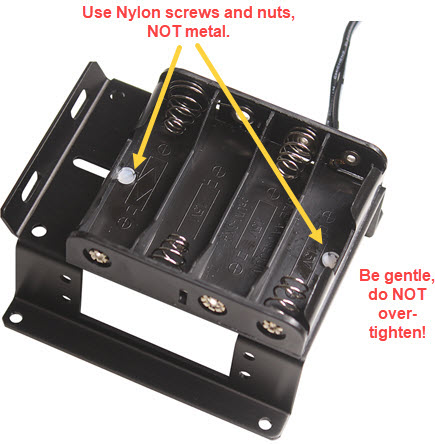
In this step you will attach the battery holder to the chassis. Be gentle with the Nylon screws and nuts in this step. Don’t overtighten.

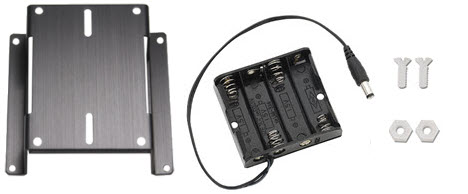
Parts Required for each robot

  • SumoBot Chassis
  • Battery Holder, 4AA with barrel plug
  • (2) #4/40 3/8″ long Nylon flat-head screws
  • (2) #4/40 Nylon nuts


  • Stand the SumoBot chassis upside-down on its PCB mounting holes.
  • Find the white Nylon screws and hex nuts. DO NOT USE METAL SCREWS FOR THIS STEP!  Metal screws can nick the coverings of batteries, creating short circuits.
  • Thread the screws through the battery pack, and then through the slots in the bottom of the chassis.
  • Secure with the Nylon nuts VERY GENTLY. Do not over-tighten which will warp the screw heads.


    Printer-friendly version
    Plug In the FLiP Module
    Prev
    Install the Servos
    Next

    DISCUSSION FORUMS | PARALLAX INC. STORE

    About | Terms of Use | Feedback: learn@parallax.com | Copyright©Parallax Inc. 2024

    © 2026 Parallax Learn • Built with GeneratePress