Skip to content
Parallax Learn

Parallax Learn

  • Welcome
  • Tutorials
        • Tutorial Series head tag

          Tutorial Series
        • Tutorial Series

          The special, classroom-ready series pages are organized collections of tutorials for our most popular hardware and/or languages. The tutorials for each topic are conveniently accessible from a single page, shown in the order it is recommended that they be completed.
        • Robotics Series Head tag

          Robotics Series
        • Robotics Series

          • Artificial Intelligence
          • Cybersecurity: Radio Data tutorialCybersecurity
          • cyber:bot + Python
          • cyber:bot + MakeCode
          • Boe-Bot Tutorial SeriesBoe-Bot
          • Arduino Shield-Bot
          • ActivityBot with C TutorialsActivityBot + C
          • ActivityBot with BlocklyProp Tutorial SeriesActivityBot + BlocklyProp
          • Scribbler 3 Tutorial SeriesScribbler 3
        • Electronics & Programming Series Head tag

          Electronics & Programming Series
          • BS2 Board of Education Tutorial SeriesBS2 Board of Education
          • Propeller C-Language BasicsPropeller C Basics
          • FLiP Try-It Kit C Tutorial SeriesFLiP Try-It Kit + C
          • FLiP Try-It Kit BlocklyProp TutorialsFLiP Try-It Kit + BlocklyProp
          • Badge WX Tutorial SeriesBadge WX
          • Propeller BlocklyProp Basics and ProjectsPropeller BlocklyProp Basics
          • View All Tutorial Series »
        • Browse Tutorials
        • Browse Tutorials

          Individual tutorials sorted by robot or kit, and language.
        • By Robot or Kit
          • ActivityBot
          • SumoBot WX
          • Boe-Bot
          • Shield-Bot
          • cyber:bot
          • Badge WX
          • ELEV-8
          • ARLO
        • By Language
        • By Language

          • Propeller C
          • Arduino
          • BlocklyProp
          • PBASIC
          • Python
          • MakeCode
          • View All Tutorials »
  • Educators
  • Reference
  • Downloads
  • Home
  • All Courses

Build your SumoBot WX

Curriculum

  • 1 Section
  • 9 Lessons
  • Lifetime
Expand all sectionsCollapse all sections
  • Build your SumoBot WX
    9
    • 1.1
      Check the Parts
    • 1.2
      Plug In the FLiP Module
    • 1.3
      Attach Battery Holder – Gently!
    • 1.4
      Install the Servos
    • 1.5
      Attach the Board
    • 1.6
      Attach the Wheels
    • 1.7
      Attach the Scoop
    • 1.8
      Servo Connections
    • 1.9
      Install the Batteries

Servo Connections

The SumoBot WX Board has servo ports for plugging in the servos cables, and a 3-position switch to power the servos only when you want to.

3-position Switch

The SumoBot PCB has a three-position power switch.

  • Position 0 – No Power to the SumoBot WX board. The Propeller FLiP is held in reset and so can’t be programmed either.
  • Position 1 – Powers SumoBot WX board except for servo ports. Good for programming and testing sensors.
  • Position 2 – Powers SumoBot WX board and servo ports. Required for the robot to move.
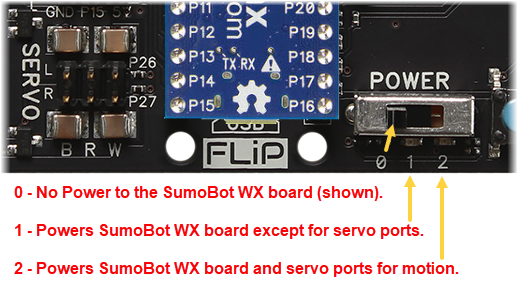
  • Set the 3-position switch to 0 for now, as shown. You should always have it in Position 0 when you plug in or remove servo cables, sensors, or batteries.


Connect the Servo Cables

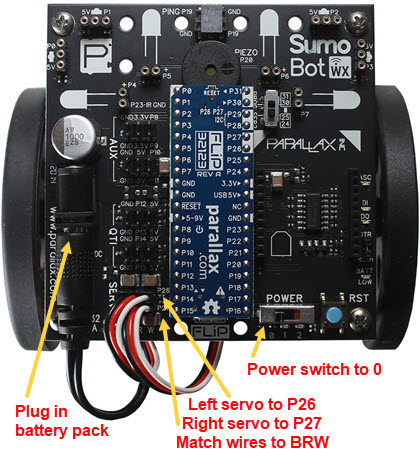
  • Make sure the 3-position switch is set to 0 for now!
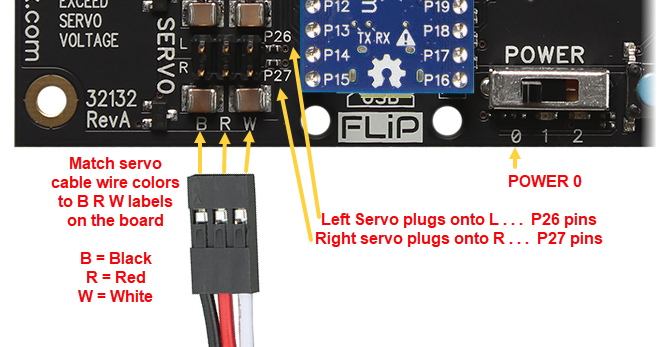
  • Check for the B R W labels on the SumoBot WX board between the servo ports and the back edge of the board.  This shows where the Black, Red, and White wires plug in for for all Servo, QTI, and AUX ports.  
  • Plug the servo motors into the servo ports.
    • P26 — Left Servo Motor
    • P27 — Right Servo Motor

  • Check both connections and verify that the white wires are closest to FLiP module.
  • Plug the battery holder’s barrel plug into the SumoBot WX board’s barrel jack.
  • Tuck any excess battery cable away in the space between the SumoBot WX board and the servos.


Printer-friendly version
Attach the Scoop
Prev
Install the Batteries
Next

DISCUSSION FORUMS | PARALLAX INC. STORE

About | Terms of Use | Feedback: learn@parallax.com | Copyright©Parallax Inc. 2024

© 2026 Parallax Learn • Built with GeneratePress