
Curriculum
- 9 Sections
- 148 Lessons
- Lifetime
Expand all sectionsCollapse all sections
- About This Tutorial3
- Chapter 1. Your Shield-Bot's Brain25
- 2.1Chapter 1. Your Shield-Bot’s Brain
- 2.2Hardware and Software Options
- 2.3Shield-Bot Chassis Parts
- 2.4Shield-Bot Hardware
- 2.5Shield-Bot Electronics Parts
- 2.6Activity 1: Download and Install the Software
- 2.7Activity 2: Write a Simple “Hello!” Sketch
- 2.8Codebender Hello Sketch
- 2.9How the Hello Sketch Code Works
- 2.10Modify the Sketch to Repeat
- 2.11Hello Messages on New Lines
- 2.12Open the Arduino Reference
- 2.13Activity 3: Store and Retrieve Values
- 2.14Global vs. Local Variables
- 2.15Activity 4: Solve Math Problems
- 2.16Try Floating Point Math
- 2.17Activity 5: Make Decisions
- 2.18More Decisions with if… else if
- 2.19Activity 6: Count and Control Repetitions
- 2.20How the for Loop Works
- 2.21Adjust Initialization, Condition, and Increment
- 2.22Activity 7: Constants and Comments
- 2.23Chapter 1 Summary
- 2.24Chapter 1 Challenges
- 2.25Chapter 1 Solutions
- Chapter 2. Shield, Lights, Servo Motors23
- 3.1Chapter 2. Shield, Lights, Servo Motors
- 3.2Activity 1: Board of Education Shield Setup
- 3.3Activity 2: Build and Test LED Indicator Lights
- 3.4Introducing the Resistor
- 3.5Introducing the LED
- 3.6Introducing the Prototyping Area
- 3.7LED Test Circuit
- 3.8How a Sketch Makes the LED Turn On and Off
- 3.9Introducing the Timing Diagram
- 3.10Activity 3: LED Servo Signal Monitors
- 3.11How to Use the Arduino Servo Library
- 3.12Activity 4: Connect Servo Motors and Batteries
- 3.13Connect the Servos to the BOE Shield
- 3.14Connect the Battery Pack to the BOE Shield
- 3.155-cell Pack Setup
- 3.164-cell Pack + Boe-Boost Setup
- 3.17Activity 5: Centering the Servos
- 3.18Activity 6: Testing the Servos
- 3.19Controlling Servo Speed and Direction
- 3.20How To Control Servo Run Time
- 3.21Chapter 2 Summary
- 3.22Chapter 2 Challenges
- 3.23Chapter 2 Solutions
- Chapter 3. Assemble and Test your BOE Shield-Bot22
- 4.1Chapter 3. Assemble and Test your BOE Shield-Bot
- 4.2Activity 1: Assembling the BOE-Shield-Bot
- 4.3Mount the Topside Hardware
- 4.4Remove the Servo Horns
- 4.5Mount the Servos on the Chassis
- 4.6Mount the Battery Pack
- 4.7Mount the Wheels
- 4.8Attach the BOE Shield to the Chassis
- 4.9Activity 2: Re-test the Servos
- 4.10Testing the Left and Right Wheels
- 4.11Servo Troubleshooting
- 4.12Activity 3: Start-Reset Indicator
- 4.13Build the Piezospeaker Circuit
- 4.14Programming the Start-Reset Indicator
- 4.15Example Sketch: StartResetIndicator
- 4.16Activity 4: Test Speed Control
- 4.17Example Sketch: Test Servo Speed
- 4.18How TestServoSpeed Works
- 4.19Optional: Record Your Own Transfer Curve Data
- 4.20Chapter 3 Summary
- 4.21Chapter 3 Challenges
- 4.22Chapter 3 Solutions
- Chapter 4. BOE Shield-Bot Navigation19
- 5.1Chapter 4. BOE Shield-Bot Navigation
- 5.2Activity 1: Basic BOE Shield-Bot Maneuvers
- 5.3How ForwardThreeSeconds Works
- 5.4Moving Backward, Rotating, and Pivoting
- 5.5Activity 2: Tuning the Basic Maneuvers
- 5.6Tuning the Turns
- 5.7Activity 3: Calculating Distances
- 5.8Activity 4: Ramping Maneuvers
- 5.9Activity 5: Simplify Navigation with Functions
- 5.10Function Call with Parameters
- 5.11Put Maneuvers Into Functions
- 5.12Activity 6: Custom Maneuver Function
- 5.13Activity 7: Maneuver Sequences with Arrays
- 5.14Using Array Elements
- 5.15Navigation with Arrays
- 5.16Character Arrays and switch-case
- 5.17Chapter 4 Summary
- 5.18Chapter 4 Challenges
- 5.19Chapter 4 Solutions
- Chapter 5. Tactile Navigation with Whiskers13
- 6.1Chapter 5. Tactile Navigation with Whiskers
- 6.2Activity 1: Build and Test the Whiskers
- 6.3How Whisker Switches Work
- 6.4Testing the Whiskers
- 6.5How DisplayWhiskerStates Works
- 6.6Activity 2: Field-Test the Whiskers
- 6.7Activity 3: Navigation with Whiskers
- 6.8How RoamingWithWhiskers Works
- 6.9Activity 4: Artificial Intelligence for Escaping Corners
- 6.10How Escaping Corners Works
- 6.11Chapter 5 Summary
- 6.12Chapter 5 Challenges
- 6.13Chapter 5 Solutions
- Chapter 6. Light-Sensitive Navigation with Phototransistors18
- 7.1Chapter 6. Light-Sensitive Navigation with Phototransistors
- 7.2Introducing the Phototransistor
- 7.3Activity 1: Simple Light to Voltage Sensor
- 7.4Example Sketch: PhototransistorVoltage
- 7.5Halt Under the Bright Light
- 7.6How the Phototransistor Circuit Works
- 7.7Ohm’s Law
- 7.8Activity 2: Measure Light Levels Over a Larger Range
- 7.9Building the Photosensitive Eyes
- 7.10Test the Phototransistor Circuit
- 7.11rcTime and Voltage Decay
- 7.12Activity 3: Light Measurements for Roaming
- 7.13Light Measurement Graphic Display
- 7.14Activity 4: Test a Light-Roaming Routine
- 7.15Activity 5: Shield-Bot Navigating by Light
- 7.16Chapter 6 Summary
- 7.17Chapter 6 Challenges
- 7.18Chapter 6 Solutions
- Chapter 7. Navigating with Infrared Headlights14
- 8.1Chapter 7. Navigating with Infrared Headlights
- 8.2Infrared Light Signals
- 8.3Activity 1: Build and Test the Object Detectors
- 8.4Object Detection Test Code
- 8.5Activity 2: Field Testing
- 8.6Sniffing for IR Interference
- 8.7Activty 3: Detection Range Adjustments
- 8.8Activity 4: Object Detection and Avoidance
- 8.9Activity 5: High-performance IR Navigation
- 8.10Activity 6: Drop-off Detector
- 8.11Example Sketch: AvoidTableEdge
- 8.12Chapter 7 Summary
- 8.13Chapter 7 Challenges
- 8.14Chapter 7 Solutions
- Chapter 8. Robot Control with Distance Detection11
- 9.1Chapter 8. Robot Control with Distance Detection
- 9.2Activity 1: Testing the Frequency Sweep
- 9.3Displaying Both Distances
- 9.4Activity 2: BOE Shield-Bot Shadow Vehicle
- 9.5A Look Inside Proportional Control
- 9.6Example Sketch: FollowingShieldBot
- 9.7Follow the Leader
- 9.8Activity 3: What’s Next?
- 9.9Chapter 8 Summary
- 9.10Chapter 8 Challenges
- 9.11Chapter 8 Solutions
Remove the Servo Horns
Parts List
(2) Parallax continuous rotation servos, previously centered
Instructions
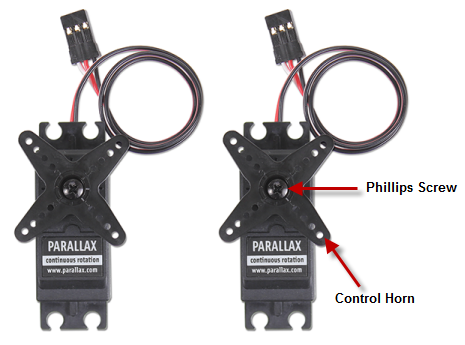
- Use a Phillips screwdriver to remove the screws that hold the servo control horns on the output shafts.
- Pull each horn upwards and off the servo output shaft.
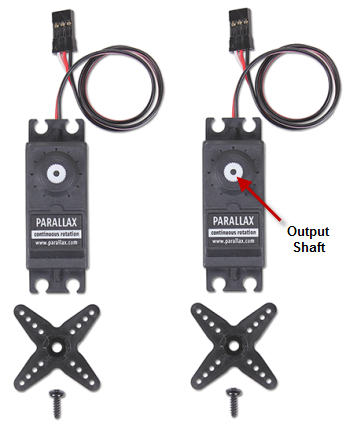
- Save the screws; you will need them again soon.
STOP! Before taking the next step, you must have completed these activities: Chapter 2, Activity 4: Connect Servo Motors and Batteries, and Chapter 2, Activity 5: Centering the Servos.