Curriculum
- 9 Sections
- 148 Lessons
- Lifetime
Expand all sectionsCollapse all sections
- About This Tutorial3
- Chapter 1. Your Shield-Bot's Brain25
- 3.1Chapter 1. Your Shield-Bot’s Brain
- 3.2Hardware and Software Options
- 3.3Shield-Bot Chassis Parts
- 3.4Shield-Bot Hardware
- 3.5Shield-Bot Electronics Parts
- 3.6Activity 1: Download and Install the Software
- 3.7Activity 2: Write a Simple “Hello!” Sketch
- 3.8Codebender Hello Sketch
- 3.9How the Hello Sketch Code Works
- 3.10Modify the Sketch to Repeat
- 3.11Hello Messages on New Lines
- 3.12Open the Arduino Reference
- 3.13Activity 3: Store and Retrieve Values
- 3.14Global vs.Local Variables
- 3.15Activity 4: Solve Math Problems
- 3.16Try Floating Point Math
- 3.17Activity 5: Make Decisions
- 3.18More Decisions with if… else if
- 3.19Activity 6: Count and Control Repetitions
- 3.20How the for Loop Works
- 3.21Adjust Initialization, Condition, and Increment
- 3.22Activity 7: Constants and Comments
- 3.23Chapter 1 Summary
- 3.24Chapter 1 Challenges
- 3.25Chapter 1 Solutions
- Chapter 2. Shield, Lights, Servo Motors23
- 4.0Chapter 2. Shield, Lights, Servo Motors
- 4.1Activity 1: Board of Education Shield Setup
- 4.2Activity 2: Build and Test LED Indicator Lights
- 4.3Introducing the Resistor
- 4.4Introducing the LED
- 4.5Introducing the Prototyping Area
- 4.6LED Test Circuit
- 4.7How a Sketch Makes the LED Turn On and Off
- 4.8Introducing the Timing Diagram
- 4.9Activity 3: LED Servo Signal Monitors
- 4.10How to Use the Arduino Servo Library
- 4.11Activity 4: Connect Servo Motors and Batteries
- 4.12Connect the Servos to the BOE Shield
- 4.13Connect the Battery Pack to the BOE Shield
- 4.145-cell Pack Setup
- 4.154-cell Pack + Boe-Boost Setup
- 4.16Activity 5: Centering the Servos
- 4.17Activity 6: Testing the Servos
- 4.18Controlling Servo Speed and Direction
- 4.19How To Control Servo Run Time
- 4.20Chapter 2 Summary
- 4.21Chapter 2 Challenges
- 4.22Chapter 2 Solutions
- Chapter 3. Assemble and Test your BOE Shield-Bot22
- 5.0Chapter 3. Assemble and Test your BOE Shield-Bot
- 5.1Activity 1: Assembling the BOE-Shield-Bot
- 5.2Mount the Topside Hardware
- 5.3Remove the Servo Horns
- 5.4Mount the Servos on the Chassis
- 5.5Mount the Battery Pack
- 5.6Mount the Wheels
- 5.7Attach the BOE Shield to the Chassis
- 5.8Activity 2: Re-test the Servos
- 5.9Testing the Left and Right Wheels
- 5.10Servo Troubleshooting
- 5.11Activity 3: Start-Reset Indicator
- 5.12Build the Piezospeaker Circuit
- 5.13Programming the Start-Reset Indicator
- 5.14Example Sketch: StartResetIndicator
- 5.15Activity 4: Test Speed Control
- 5.16Example Sketch: Test Servo Speed
- 5.17How TestServoSpeed Works
- 5.18Optional: Record Your Own Transfer Curve Data
- 5.19Chapter 3 Summary
- 5.20Chapter 3 Challenges
- 5.21Chapter 3 Solutions
- Chapter 4. BOE Shield-Bot Navigation19
- 6.0Chapter 4. BOE Shield-Bot Navigation
- 6.1Activity 1: Basic BOE Shield-Bot Maneuvers
- 6.2How ForwardThreeSeconds Works
- 6.3Moving Backward, Rotating, and Pivoting
- 6.4Activity 2: Tuning the Basic Maneuvers
- 6.5Tuning the Turns
- 6.6Activity 3: Calculating Distances
- 6.7Activity 4: Ramping Maneuvers
- 6.8Activity 5: Simplify Navigation with Functions
- 6.9Function Call with Parameters
- 6.10Put Maneuvers Into Functions
- 6.11Activity 6: Custom Maneuver Function
- 6.12Activity 7: Maneuver Sequences with Arrays
- 6.13Using Array Elements
- 6.14Navigation with Arrays
- 6.15Character Arrays and switch-case
- 6.16Chapter 4 Summary
- 6.17Chapter 4 Challenges
- 6.18Chapter 4 Solutions
- Chapter 5. Tactile Navigation with Whiskers13
- 7.0Chapter 5. Tactile Navigation with Whiskers
- 7.1Activity 1: Build and Test the Whiskers
- 7.2How Whisker Switches Work
- 7.3Testing the Whiskers
- 7.4How DisplayWhiskerStates Works
- 7.5Activity 2: Field-Test the Whiskers
- 7.6Activity 3: Navigation with Whiskers
- 7.7How RoamingWithWhiskers Works
- 7.8Activity 4: Artificial Intelligence for Escaping Corners
- 7.9How Escaping Corners Works
- 7.10Chapter 5 Summary
- 7.11Chapter 5 Challenges
- 7.12Chapter 5 Solutions
- Chapter 6. Light-Sensitive Navigation with Phototransistors18
- 8.0Chapter 6. Light-Sensitive Navigation with Phototransistors
- 8.1Introducing the Phototransistor
- 8.2Activity 1: Simple Light to Voltage Sensor
- 8.3Example Sketch: PhototransistorVoltage
- 8.4Halt Under the Bright Light
- 8.5How the Phototransistor Circuit Works
- 8.6Ohm’s Law
- 8.7Activity 2: Measure Light Levels Over a Larger Range
- 8.8Building the Photosensitive Eyes
- 8.9Test the Phototransistor Circuit
- 8.10rcTime and Voltage Decay
- 8.11Activity 3: Light Measurements for Roaming
- 8.12Light Measurement Graphic Display
- 8.13Activity 4: Test a Light-Roaming Routine
- 8.14Activity 5: Shield-Bot Navigating by Light
- 8.15Chapter 6 Summary
- 8.16Chapter 6 Challenges
- 8.17Chapter 6 Solutions
- Chapter 7. Navigating with Infrared Headlights14
- 9.0Chapter 7. Navigating with Infrared Headlights
- 9.1Infrared Light Signals
- 9.2Activity 1: Build and Test the Object Detectors
- 9.3Object Detection Test Code
- 9.4Activity 2: Field Testing
- 9.5Sniffing for IR Interference
- 9.6Activty 3: Detection Range Adjustments
- 9.7Activity 4: Object Detection and Avoidance
- 9.8Activity 5: High-performance IR Navigation
- 9.9Activity 6: Drop-off Detector
- 9.10Example Sketch: AvoidTableEdge
- 9.11Chapter 7 Summary
- 9.12Chapter 7 Challenges
- 9.13Chapter 7 Solutions
- Chapter 8. Robot Control with Distance Detection11
- 10.0Chapter 8. Robot Control with Distance Detection
- 10.1Activity 1: Testing the Frequency Sweep
- 10.2Displaying Both Distances
- 10.3Activity 2: BOE Shield-Bot Shadow Vehicle
- 10.4A Look Inside Proportional Control
- 10.5Example Sketch: FollowingShieldBot
- 10.6Follow the Leader
- 10.7Activity 3: What’s Next?
- 10.8Chapter 8 Summary
- 10.9Chapter 8 Challenges
- 10.10Chapter 8 Solutions
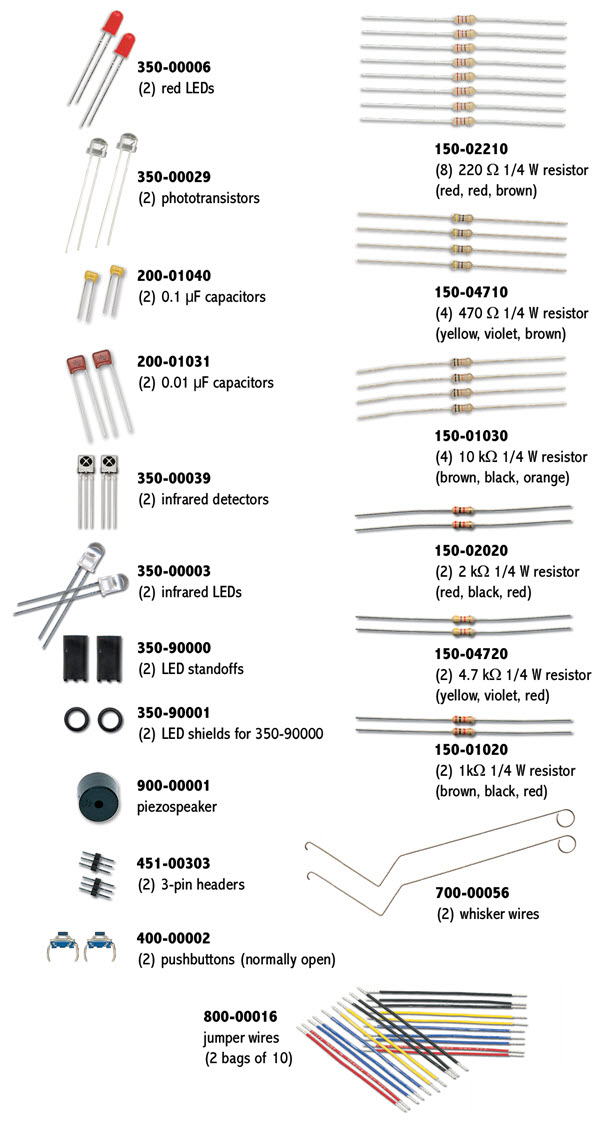
Shield-Bot Electronics Parts
A bag of electronic components is included with your kit. You will use these parts to build circuits in almost every chapter of this book. This kit is also available separately as the Boe-Bot and Shield-Bot Refresher Pack.
Note: Your Infrared Receivers may look different, since suppliers change over time. If you ever need replacements, be sure to order the Infrared Receiver for Boe-Bot and Shield-Bot (#350-00039).